Isolating Individual Test Dates
By default, when you include test scores in an export or the Application Summary, Outcomes displays all instances of that test. If you're more interested in collecting just one test date, you can use a JavaScript expression to isolate that value.
In this article, you'll learn to apply JavaScript to a custom property or an export field that allows you to distill multiple test scores into one value. This can be used in connection with ACTs, GMATs, MCATs, SATs, or other tests that can have multiple values.
Add the JavaScript Code
You have two options when adding the JavaScript Code for this configuration:
- Create a custom property using this code. Once created, Custom Properties are listed among the Available Fields in the Export Builder.
- Add the JavaScript expression directly from the Export Builder by selecting the Custom option from the Available Fields menu, and dropping it into the Columns window.
In either case, you'll have an Expression area to add your code and configure it as desired.
In the Expression area, add the following code. This snippet results in one field that displays a date value as described above. (Use the view source icon at the top right to copy the code snippet.)
{
    let formName = "formName";
    let testName = "testName";
    let testField = "testField";
    let dateField = "dateField";
    let index = 0;

    if (forms?.[formName]?.[testName]?.rows?.length > 0) {
        if (forms?.[formName]?.[testName]?.rows[index]?.[dateField] != null) {

            var date = new Date(forms?.[formName]?.[testName]?.rows[index]?.[dateField]);
            var yr = date.getFullYear();
            var mon = date.getMonth() + 1;
            mon = (mon.toString().length == 1) ? '0' + mon : mon;
            var day = date.getDate();
            day = (day.toString().length == 1) ? '0' + day : day;
            dateFormatted = (date) ? yr + '/' + mon + '/' + day : "";
            return dateFormatted;
        }
    }
    else {
        return "";
    }
}
After dropping in this code, you'll need to update the variables so that it will work with the test of your choice. Review the guidance below for more details.
Updating the Variables
For this expression to work in your environment, you'll need to replace the variables at the top of the code snippet. By updating the variables listed below, you'll indicate which test's date you'd like to extract.
- formName - replace this variable with the key of the form where the test results are collected. For example, standardized_tests.
- testName - replace this variable with the key of the table that contains the test results you need. For example, gmat.
- testField - replace this variable with the key of the specific field that you're working with. For example, gmat_quantitative.
- dateField - replace this variable with the key of the date field related to the test you're working with. For example, gmat_date.
For more details, review Finding the Keys to Use.
Finding the Keys to Use
The test scores you need are typically stored in an applicant form. Within the form, the details of each test, including scores, dates, and other relevant information, might be captured in a table. Review the steps below to modify the code to work with tests that are stored in a table.
- Replace formName with the key associated with the form that you are pulling the score from. As an example, if you were pulling results from the form in the example below, gradeScores (found in the Key field at the top of the form) would be the appropriate name to use.

- Replace testName with the key from the table you want to use. In the example above, satoptional is the key you would use.
- Replace testField with the key from the column you want to use. To find the key, click the column heading of the column that contains your test scores. In the window that appears, note the Key field on the right. In the example above, you'd click the Evidence-Based Reading and Writing column heading to bring up the column details, including the satEvidenceBasedReadingAndWriting key, as seen below.
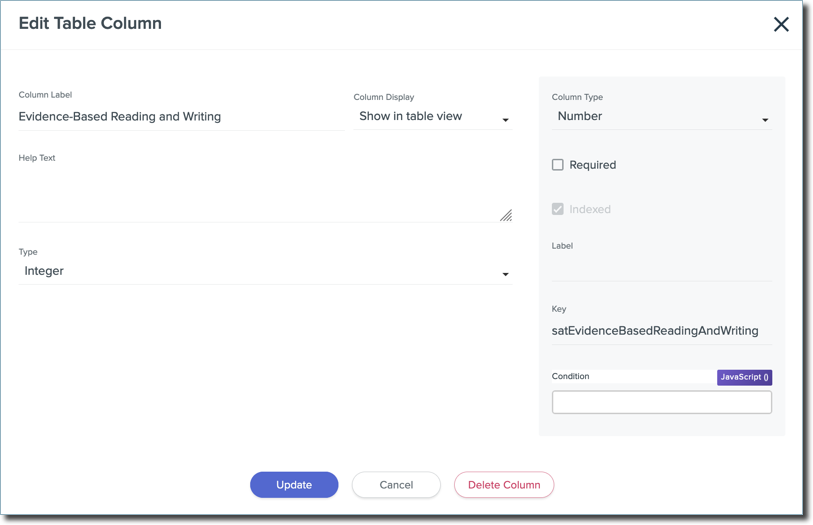
- Next, replace testDate with the key from the date field column. In the example above, you'd click the Exam Date column heading to bring up the column details, including its key.
Using the example above, the editable area of the code would appear as follows:
    let formName = "gradesScores";
    let testName = "satoptional";
    let testField = "satEvidenceBasedReadingAndWriting";
    let dateField = "satExamDate";
    let index = 0;
- After modifying the expression, click Update to save your work.
Testing the Code
While building the export or your calculated property, click the Try It button to confirm that your variables are working.
Search for a record to complete your tests with. Confirm that the appropriate value appears in the Output window.
This article corresponds with JSO-7.