Release 7 – August 2, 2026
New Features and Enhancements
CAS Applicant Portal Enhancements
Disclaimer: on rare occasions, a new feature or enhancement may be moved to a future release or otherwise subject to change.
Chat Icon Relocated and Rebranded
For CASs on the CAS 3+ platform that use the chatbot, this enhancement is automatically available for use. No action is required on the part of any association, school, or program. Contact a member of your account team for more information.
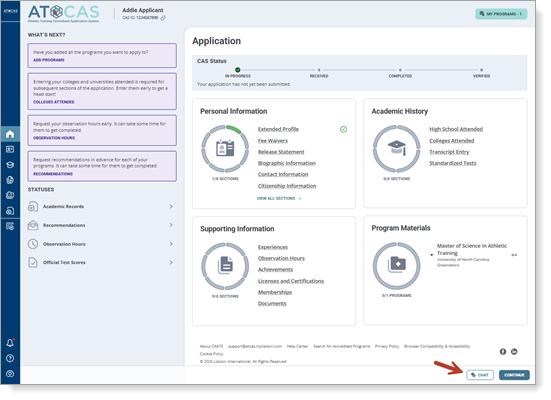
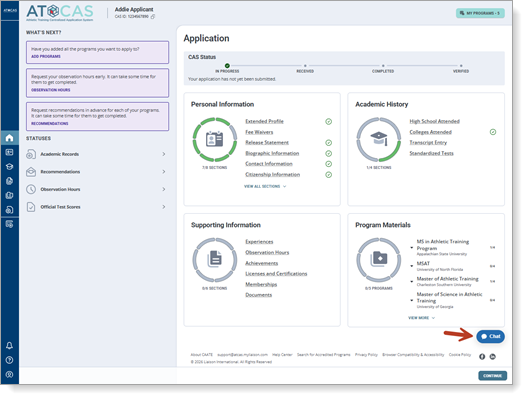
To improve upon the user experience when navigating around the CAS application and accessing Cassie, the CAS chatbot, the chat icon is now available in the footer of the application, next to the Continue button. Previously, it floated above the application in the bottom right corner, which was causing some issues as applicants were completing sections. Additionally, the chat icon now matches the rest of the CAS’s color branding for greater visual consistency.
New location
Previous location
Liaison Outcomes Enhancements
The following enhancements are now available in Liaison Outcomes. If you have any questions about these features, contact a member of your account team or support.
Disclaimer: on rare occasions, a new feature or enhancement may be moved to a future release or otherwise subject to change.
New Marketing Dashboard: Sending Metrics and Engagement
Starting August 9, this enhancement is automatically available for use by all CASs and participating programs. No action is required on the part of any association, school, or program. Contact a member of your account team for more information.
Outcomes now has a Sending Activity & Engagement dashboard in the Marketing section. This dashboard provides a centralized view of marketing campaign performance across email, text messaging, and voice campaigns.

With the new dashboard, you can:
- Monitor campaign sending and engagement trends.
- Review key metrics like emails sent, delivered, opened, failed, etc.
- Identify underperforming campaigns.
The dashboard also includes a detailed reporting table that breaks down metrics by campaign track, helping users investigate delivery or engagement issues more efficiently.
Note that the dashboard reporting uses data beginning from April 12, 2026.
Export Event Registrant List to CSV
Starting August 9, this enhancement is automatically available for use by all CASs and participating programs. No action is required on the part of any association, school, or program. Contact a member of your account team for more information.
You can now download a CSV file that includes registrants for any event occurrence directly from the registrants view, including registered guests. When you click the Download registrants to CSV button, Outcomes exports names, emails, event details, registration date/status, and guest counts to a CSV file so you can use the list at in‑person events or load it into other systems for tracking and follow‑up.
Copyable Reference Portal Link for Individual Requestees
Starting August 9, this enhancement is automatically available for use by all CASs and participating programs. No action is required on the part of any association, school, or program. Contact a member of your account team for more information.
You can now copy a direct, secure link to the reference portal for a specific reference request, making it easier to help recommenders who cannot access the original email. From the application view, a new Copy link button appears on each reference form record for users with Manage Reference Portal access, allowing you to paste the tokenized link to share as needed.
This enhancement streamlines troubleshooting when references have email delivery issues or need a new way to reach the portal, while preserving secure access to the correct recommendation form.
Additional Ability to Segment Contacts Using Touchpoints
Starting August 9, this enhancement is automatically available for use by all CASs and participating programs. No action is required on the part of any association, school, or program. Contact a member of your account team for more information.
Outcomes now allows users to leverage touchpoints directly within the Segment Builder, making it easier to identify and report on contacts and applications based on key interactions throughout the student journey. Highlights of this enhancement include:
- The ability to filter contacts and applications by touchpoint activity, including:
- Marketing emails, text messages, and voice messages
- Event registrations and check-ins
- Inquiry form submissions
- Application starts
- Application stage and phase changes
- The ability to further refine segments using:
- Touchpoint actions (e.g., Delivered, Opened, Registered)
- Campaigns and tracks
- Individual communication items
- Custom date ranges
These enhancements give you greater visibility into engagement trends and make it easier to build targeted audiences for reporting, outreach, and enrollment analysis.