Using the CRM Export
Understanding the CRM Export
The TargetX CRM export is an Informatica Task Flow comprised of several Informatica Cloud Data Synchronization (DSS) Tasks. The sequence of the DSS tasks is vital to make sure that the client receives the correct data. The TargetX CRM export - Contact v2 DSS task is first in the task flow because it provides the Contact Id used throughout the process. All remaining objects will utilize two (2) DSS tasks to:
- Filter the CRM records and attempt to look up a Contact Id in TargetX CRM export - Contact v2.
- Create a final object export file, based on the results of #1, to be consumed by the SIS.
Below is a walkthrough of the sequence in the TargetX CRM export v2 task flow:
- TargetX CRM export - Contact v2 → primary process that exports all Contact records, based on the appropriate data filter.
- This DSS task should always be first in the task flow. This ensures we have the Contact Id throughout the rest of the task flow.
- The file produced from this task, crmexport_contact.csv, will be referenced throughout the rest of the task flow and used as the import file to the SIS.
- The default data filter is:
- TargetX_Datab__Ready_To_Export_Date__c >= $LastRunTime
- see “How Do I Set It Up?” for more information on the TargetX_Datab__Ready_To_Export_Date__c field.
- this can be configured on a per-client basis
- TargetX CRM export - Application - step1 v2
- queries the Application object and attempts to lookup the Contact Id from the crmexport_contact.csv file in the TargetX CRM export - Contact v2 task (see below)
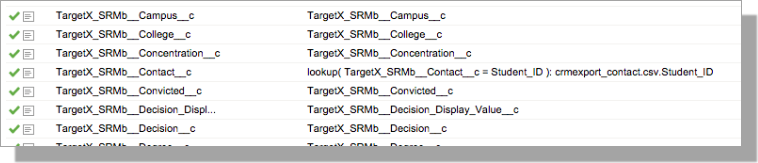
- the result of this export is a file, called Application_wContactId_Lookup.csv, that contains ALL Application object fields
- this is a temporary/lookup file that is only used by our processing
- the TargetX_SRMb__Contact__c column will only be populated if the lookup finds a Contact in the crmexport_contact.csv file
- the default data filter for this task is:
- TargetX_SRMb__Stage__c Equals 'Submitted'
- this can be configured on a per-client basis
- TargetX CRM export - Application - step2 v2
- uses the Application_wContactId_Lookup.csv file as the Source and only maps records where the TargetX_SRMb__Contact__c is NOT NULL
- Applications will only be exported if they are associated with a Contact
- no additional data filters are needed on this task
- A diagram of this process is below
Note: the remaining DSS tasks work the same as the TargetX CRM export - Application - step1 v2 and TargetX CRM export - Application - step2 v2 tasks above, so these will be described briefly.
- TargetX CRM export - Enrollment - step1 v2
- queries the Enrollment History object and attempts to lookup the Contact Id from the crmexport_contact.csv file in the TargetX CRM export - Contact v2 task (see below)
- the result of this export is a file called Enrollment_wContactId_Lookup.csv, which contains ALL Enrollment History object fields
- the TargetX_SRMb__Contact__c column will only be populated if the lookup finds a Contact in the crmexport_contact.csv file
- the data filter can be configured on a per-client basis
- TargetX CRM export - Enrollment - step2 v2
- uses the Enrollment_wContactId_Lookup.csv file as the Source and only maps records where the TargetX_SRMb__Contact__c is NOT NULL
- Enrollment History records will only be exported if they are associated with a Contact
- no additional data filters are needed on this task
- TargetX CRM export - TestScore - step1 v2
- queries the Test object and attempts to lookup the Contact Id from the crmexport_contact.csv file in the TargetX CRM export - Contact v2 task (see below)
- the result of this export is a file, called Test_wContactId_Lookup.csv, that contains ALL Test object fields
- the TargetX_SRMb__Contact__c column will only be populated if the lookup finds a Contact in the crmexport_contact.csv file
- the data filter can be configured on a per-client basis
- TargetX CRM export - TestScore - step2 v2
- uses the Test_wContactId_Lookup.csv file as the Source and only maps records where the TargetX_SRMb__Contact__c is NOT NULL
- Test records will only be exported if they are associated with a Contact
- no additional data filters are needed on this task
- TargetX CRM export - Essay - step1 v2
- queries the Essay object and attempts to lookup the Contact Id from the crmexport_contact.csv file in the TargetX CRM export - Contact v2 task (see below)
- the result of this export is a file, called Essay_wContactId_Lookup.csv, that contains ALL Essay object fields
- the TargetX_SRMb__Contact__c column will only be populated if the lookup finds a Contact in the crmexport_contact.csv file
- the data filter can be configured on a per-client basis
- TargetX CRM export - Essay - step2 v2
- uses the Essay_wContactId_Lookup.csv file as the Source and only maps records where the TargetX_SRMb__Contact__c is NOT NULL
- Essay records will only be exported if they are associated with a Contact
- no additional data filters are needed on this task
- TargetX CRM export - FinAid - step1 v2
- queries the Financial Aid object and attempts to lookup the Contact Id from the crmexport_contact.csv file in the TargetX CRM export - Contact v2 task (see below)
- the result of this export is a file called FinAid_wContactId_Lookup.csv, which contains ALL Financial Aid object fields
- the TargetX_SRMb__Contact__c column will only be populated if the lookup finds a Contact in the crmexport_contact.csv file
- the data filter can be configured on a per-client basis
- TargetX CRM export - FinAid - step2 v2
- uses the FinAid_wContactId_Lookup.csv file as the Source and only maps records where the TargetX_SRMb__Contact__c is NOT NULL
- Financial Aid records will only be exported if they are associated with a Contact
- no additional data filters are needed on this task
- TargetX CRM export - Recommendation - step1 v2
- queries the Recommendation object and attempts to lookup the Contact Id from the crmexport_contact.csv file in the TargetX CRM export - Contact v2 task (see below)
- the result of this export is a file, called Recommendation_wContactId_Lookup.csv, that contains ALL Recommendation object fields
- the TargetX_SRMb__Contact__c column will only be populated if the lookup finds a Contact in the crmexport_contact.csv file
- the data filter can be configured on a per-client basis
- TargetX CRM export - Recommendation - step2 v2
- uses the Recommendation_wContactId_Lookup.csv file as the Source and only maps records where the TargetX_SRMb__Contact__c is NOT NULL
- Recommendation records will only be exported if they are associated with a Contact
- no additional data filters are needed on this task
- TargetX CRM export - Relationship - step1 v2
- queries the Relationship object and attempts to lookup the Contact Id from the crmexport_contact.csv file in the TargetX CRM export - Contact v2 task (see below)
- the result of this export is a file, called Relationship_wContactId_Lookup.csv, that contains ALL Relationship object fields
- the TargetX_SRMb__Contact__c column will only be populated if the lookup finds a Contact in the crmexport_contact.csv file
- the data filter can be configured on a per-client basis
- TargetX CRM export - Relationship - step2 v2
- uses the Relationship_wContactId_Lookup.csv file as the Source and only maps records where the TargetX_SRMb__Contact__c is NOT NULL
- Relationship records will only be exported if they are associated with a Contact
- no additional data filters are needed on this task