Configuring Remote Site Settings
- Navigate to Setup and search for Remote Site Settings.
- Click on New Remote Site.
- Enter a Remote Site Name = MDAPI.
For Enhanced Domains
Enter the following for the Remote Site URL: https://XXX--tgtx-retention.vf.force.com, updating the XXX with your custom domain.
Example: https://myschool--tgtx-retention.vf.force.com
You can find your custom domain name by navigating to your Student Success Center and copying it from the URL:

For NON-Enhanced Domains
Enter the following for the Remote Site URL: https://XXX.naYY.visual.force.com, updating the XXX with your custom domain name and YY with the value for your Salesforce instance.
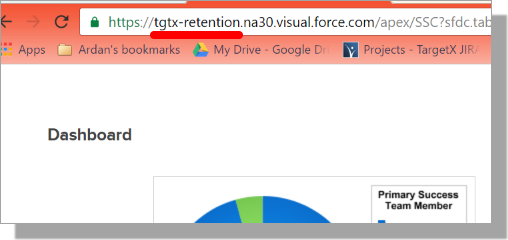
Example: https://tgtx-retention.na30.visual.force.com
Note: If using a SANDBOX, replace "na" with "cs."
You can find your custom domain name by navigating to your Student Success Center and copying it from the URL:
- Check the Active checkbox.
- Save your changes.
Notes about Remote Site Settings:
- In Sandboxes, Remote Site settings must be recreated after a sandbox refresh.
- If Remote Site Settings are incorrect or missing, users will receive an error about an Unauthorized endpoint. To resolve this, copy the URL from the error message and create a NEW Remote Site Setting with the Callback URL = the URL in the error message.