
US and English-Canadian Dental School Transcripts
Requirements
How to Send US or English-Canadian Dental School Transcripts
Sending Dental School Transcripts by Mail
Sending Dental School Transcripts Electronically
Please note that electronic transcripts are not the same as emailed transcripts. We cannot accept transcripts sent via email.
ADEA PASS only accepts electronic transcripts from Parchment and National Student Clearinghouse. If your school does not offer either of these services, your transcript must be sent by mail.
If your school requires that you use a service other than Parchment or National Student Clearinghouse, you should ask that service to mail the transcripts instead of sending them electronically. Since you cannot include the Transcript ID Form, you should include your full ADEA PASS ID number when entering the ADEA PASS mailing address.
When using any of these services, select ADEA PASS as the recipient. If you can't select ADEA PASS and instead are asked for an email address, your transcript must be sent by mail. Do not send your transcript to the ADEA PASS customer service email.
Parchment
Confirm that your school offers the Parchment service. If your school is not listed, your transcript must be sent by mail. If your school is listed, follow the instructions to proceed. Once your transcript is requested, it takes up to five business days for it to post to your application. If your transcript is not posted after this timeframe, contact Parchment directly to confirm the order was completed, then contact customer service.
Note that if you need to enter your transcript's unique barcode ID, you can find this by clicking Order for your transcript on the Academic Records page.
National Student Clearinghouse
Confirm that your school offers the National Student Clearinghouse service. If you attended Geneva College or Geneva College Portage Learning, review their transcript guidelines before you order transcripts.
If your school is not listed, your transcript must be sent by mail. If your school is listed, complete the following:
- From the menu bar, click Order–Track–Verify > Order a Transcript.
- Enter the school you wish to order a transcript from, then click Continue.
- Click Order Transcript.
- Follow the prompts and enter the required information.
- When selecting the recipient (i.e., Who are you sending your transcript to?), select Educational Organization, Application Service and Scholarships.
- When entering recipient details, select ADEA PASS from the Select Organization drop-down, then enter the CAS Transcript ID. This ID is located in the ADEA PASS on-screen instructions when ordering electronic transcripts and below the barcode on the Transcript ID Form issued to you by ADEA PASS (the barcode is located in the upper right corner of this form). Note that ADEA PASS may be selected automatically for you in the Select Organization drop-down. Additionally, ADEA PASS may be listed with an association name, such as in the example below.
Example: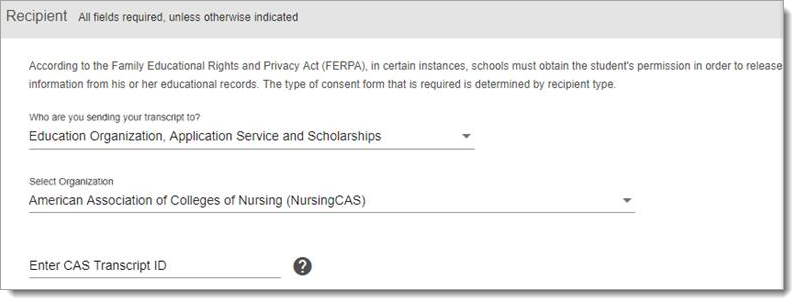
If the Enter CAS Transcript ID field does not appear, then your transcript cannot be sent to ADEA PASS electronically.
Once your transcript is requested, it takes up to five business days for it to post to your application. If your transcript is not posted after this timeframe, contact ADEA PASS customer service to confirm the order was completed.
Please note that use of these services does not expedite the processing of transcripts.