
Release 10 – November 1, 2026
New Features and Enhancements
Transfer Planner Enhancements
The following enhancements are now available in CSU Transfer Planner Student and Campus (i.e., University and Community College) Portals. If you have any questions about these features, contact a member of your account team or support.
CSU Transfer Planner Campus (i.e., University and Community College) Portals are built upon the Liaison Outcomes product, and so where you see "Outcomes" listed below, it applies to CSU Transfer Planner as well.
Disclaimer: on rare occasions, a new feature or enhancement may be moved to a future release or otherwise subject to change.
Student & Campus Portals: Combined View of GE, Major, and ADT Coursework
Students can now view General Education (GE), Major, and ADT coursework from a single, combined view. This view also supports students pursuing either the CSU GE Breadth and Cal-GETC general education patterns.

Campus users can also access a combined course summary view.

These combined views simplify finding, accessing, and reviewing matched coursework requirements that appear across multiple pages.
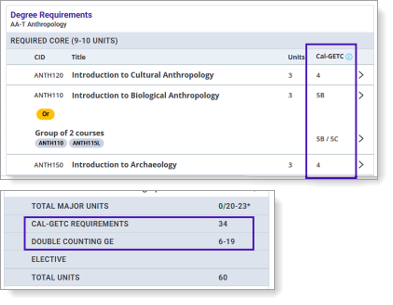
Additionally, on the Followed Programs page, the ADT curricula now show how degree requirements can also be used to meet the Cal-GETC general education requirements. These enhancements help students see that they are maximizing their coursework to meet both degree and general education requirements by indicating whether courses meet one, both, or neither requirement.
Student & Campus Portals: AP and IB Test Updates
Several new Advanced Placement (AP) and International Baccalaureate (IB) tests have been added for students to report, and some of the test names have been updated to reflect the College Board's renaming.
New tests include:
- AP African American Studies (3 units)
- AP Business with Personal Finance (3 units)
- IB Digital Society HL (6 units)
- IB World Religions HL (6 units total; 3 GE Units for Area 3B)
The following tests were renamed:
- AP Studio Art: 2-D Design renamed AP 2-D Art and Design
- AP Studio Art: 3-D Design renamed AP 3-D Art and Design
- AP Studio Art: Drawing renamed AP Drawing
Additionally, some tests have been updated to meet CSU's transfer and general education credit requirements.
- AP Research (updated from 6 units to 3 units)
- IB Business Management HL (6 units)
- IB Computer Science HL (6 units)
- IB Design Technology HL (6 units)
- IB Dance HL (6 units)
- IB Environmental Systems and Societies HL (6 units)
- IB Film HL (6 units)
- IB Global Politics HL (3 units total; 3 GE units for Area 4)
- IB Music HL (6 units)
- IB Philosophy HL (6 units total; 3 GE units for Area 3B)
- IB Social and Cultural Anthropology HL (6 units total; 3 GE units for Area 4)
- IB Sports, Exercise and Health Science HL (6 units)
- IB Visual Arts HL (6 units)
Campus Portals: Tracking Metrics for TSP Matriculation and Transfer Success
To help CSU and CCC users determine student engagement, you can now view a student's account creation and last login date.
Additionally, to help you report on success metrics for the Transfer Success Pathways Program, the following calculations are now available to you:
- TSP Matriculated Success: the matriculated program is the same as the TSP program, and the matriculation date is within the 6-semester deadline.
- TSP Matriculated Expired: the matriculated program is the same as the TSP program, but the matriculation date is past the 6-semester deadline.
- TSP Matriculated Different Program: the matriculated program is different from the TSP program.
- TSP Time to Transfer: this calculation is in semesters from the TSP Enrollment start date to the Matriculation Term and Year.
- Matriculated: STEM: this identifies if the CAS matriculated program is considered a STEM program in Transfer Planner via the CSU Major Pathway for STEM programs.
- Time to Transfer: this calculation is in semesters for all Transfer Planner students with a matriculated bachelor's degree program via the college enrollment term and year to the matriculation term and year.
