Release 10 – November 1, 2026
New Features and Enhancements
Liaison Outcomes Enhancements
The following enhancements are now available in Liaison Outcomes. If you have any questions about these features, contact a member of your account team or support.
Disclaimer: on rare occasions, a new feature or enhancement may be moved to a future release or otherwise subject to change.
Marketing Campaign Conversions
This enhancement is automatically available for use by all CASs and participating programs. No action is required on the part of any association, school, or program. Contact a member of your account team for more information.
Outcomes now allows you to measure marketing campaign conversions. A conversion is a desired action a recipient takes after receiving outreach from a campaign track, such as starting an application, registering for an event, or making a payment. Tracking conversions helps you measure whether your outreach is leading to the results you want.
For each campaign track, you can configure up to three conversion actions and define a conversion window that determines how long after the track ends an action can count as a conversion.
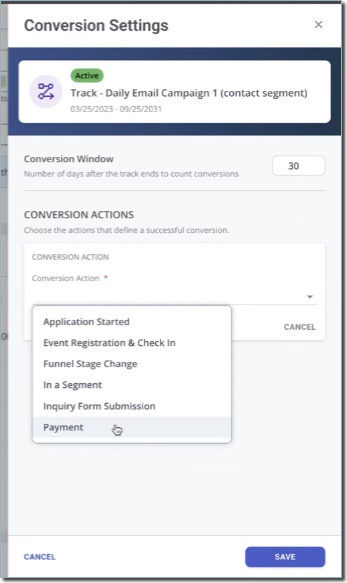
Supported conversion actions depend on the track's audience type:
- Conversion actions for applications: Application Stage Change, Application Started, In a Segment, and Payments
- Conversion actions for contacts: Application Started, Event Registration & Check-In, Funnel Stage Change, In a Segment, Inquiry Form Submission, and Payments.
Using segments as a conversion action further helps you pinpoint the results you want. For example, you can create a segment that identifies contacts who became applicants, then use that segment as a conversion action. Outcomes shows you a total conversion count and conversion rate for each track, helping you evaluate your campaigns' performance beyond message delivery and engagement.
New Inquiry Portal Configuration User Interface
This enhancement is automatically available for use by all CASs and participating programs. No action is required on the part of any association, school, or program. Contact a member of your account team for more information.
The Inquiry Portal configuration experience has been redesigned. The updated page organizes existing configuration sections into tabs, and adds a portal preview so you can quickly review the portal’s initial appearance, and offers the option to update your portal's colors without working with CSS code.
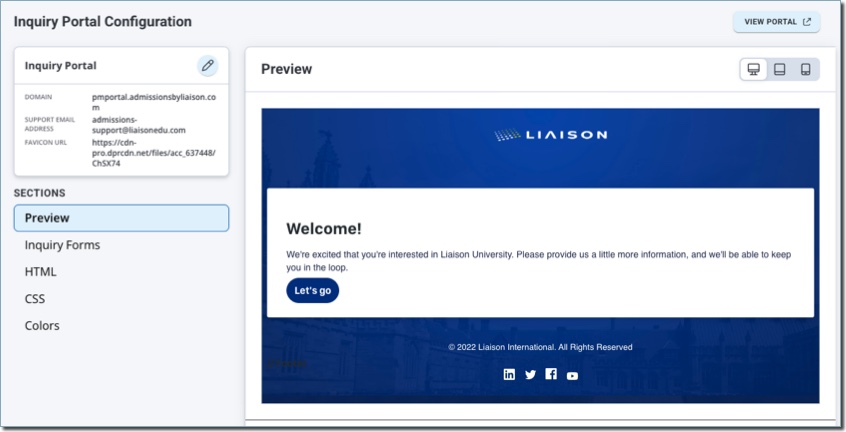
The settings of your existing portals and implementations will not be impacted by this update.
New Reference Portal Configuration User Interface
This enhancement is automatically available for use by all CASs and participating programs. No action is required on the part of any association, school, or program. Contact a member of your account team for more information.
The Reference Portal configuration experience has been redesigned. The updated page organizes existing configuration sections into tabs, and adds a portal preview so you can quickly review the portal’s initial appearance, and offers the option to update your portal's colors without working with CSS code.

Reference forms continue to be configured through the program configuration. The settings of your existing portals and implementations will not be impacted by this update.
Clearer Event Names in Registration and Check-In Touchpoints
This enhancement is automatically available for use by all CASs and participating programs. No action is required on the part of any association, school, or program. Contact a member of your account team for more information.
Outcomes now displays the internal Event Name, rather than the public Event Name, in event registration and check-in touchpoints. This makes it easier to identify the correct event when multiple events share the same public-facing name. For example, staff can distinguish "Nursing Open House (October)" from "Nursing Open House (November)," even if both use "Nursing Open House" as their public-facing name.
You'll see the internal event name in:
- Event registration and check-in activity on contact records.
- The list of events on a contact's Events tab.
- Event series searches, selections, and saved labels in the Event Registration & Check-In touchpoint filter.
Student-facing event names remain unchanged, including those shown in the Student Portal and emails. Note that this enhancement changes how events are labeled, not which registrations match your filters.
Applications Grid Column Limit
This enhancement is automatically available for use by all CASs and participating programs. No action is required on the part of any association, school, or program. Contact a member of your account team for more information.
For more reliability and better performance, Outcomes now limits the number of columns you can add to the Applications Grid. A maximum of 50 columns are allowed at once.
Export Marketing Campaign Analytics Stats
This enhancement is automatically available for use by all CASs and participating programs. No action is required on the part of any association, school, or program. Contact a member of your account team for more information.
You can now export marketing campaign analytics from Outcomes for review and analysis.

You can access the export options from:
- the Campaigns Grid by clicking Export from the 3-dots menu.
- the Campaign Tracks list by clicking Export track from the 3-dots menu.
This allows you to download a CSV file with a point-in-time view of the campaign's current analytics, including campaign and track data.
Add Event to Calendar
This enhancement is automatically available for use by all CASs and participating programs. No action is required on the part of any association, school, or program. Contact a member of your account team for more information.
Event-registration confirmation emails now include an .ics calendar invitation attachment. After registering for an event, your contacts can download the .ics attachment that Outcomes includes in the automated confirmation email, allowing them to add the event to their personal calendar. This applies to all new registrants for events, including registrants you've added manually.
Coming Soon: Classic Email Editor Retirement
Outcomes will retire the Classic HTML editor used to create marketing email templates. After this change, you will no longer be able to create or edit marketing email templates with the classic editor. Instead, continue to use the current email template options. Note that existing templates configured with the classic editor will remain sendable.