
January 2027 SMS Consent Management Requirement
Beginning with the January 2027 package, a new requirement will apply to sending SMS messages through the TargetX Communication Planner. This requirement is intended to improve visibility, compliance, and consistency across SMS messaging.
Note: this requirement applies only to the January 2027 package and later versions. It does not apply to earlier Communication Planner packages, such as 2609.01 and 2605.
Summary of What’s Changing
Required in the January 2027 Communication Planner package: select a checkbox field for comm planner to determine whether a recipient has agreed to receive SMS (SMS Opt-In field).
- Outbound SMS elements or messages will not process without updating the recipient’s SMS opt-in field (indicating consent to receive SMS).
- You can map an existing checkbox (boolean) field where you may already be capturing opt-in for SMS messaging. If the checkbox value is ‘true’ in the selected field, a Contact will be considered eligible to receive any SMS from your Communication Planner system.
- If you aren’t capturing SMS opt-in in your CRM, you can create a custom checkbox field or use the packaged field provided by TargetX.
- If the value of the connected field is found to be ‘false’, that recipient will be ‘skipped’ when sending SMS content through the Communication Planner. They will be unable to receive SMS elements or 1:1 communication via SMS Inbox until the global opt-in field has been marked true.
Additional Changes That Are Not Required, But Available
- Messaging Service-Level SMS Opt-In and Opt-Out Tracking to capture subscriber consent activity directly related to each messaging service used with Communication Planner.
- In the January 27 package, Communication Planner will sync opt-in/opt-out activity to a new child object of Contacts and Parents (Relationship V1).
- Communication Planner admins will choose whether they want SMS sending to be based on messaging service opt-ins or opt-outs.
- If based on opt-in records: an opt-in record for that messaging service will need to be associated with that recipient.
- If based on opt-outs: a recipient with an associated opt-out record for that messaging service will not receive SMS messaging sent from that messaging service.
What You Should Do Before Installing the January 2027 Package
If you plan to send SMS messages out of Communication Planner, choose the field that will serve as recipient SMS consent (opt-in):
- An existing SMS opt-in field already maintained in your CRM.
- The new SMS Opt-In field provided by TargetX (to be released with the Winter Communication Planner package).
If You Already Capture SMS Consent (Opt-In Field)
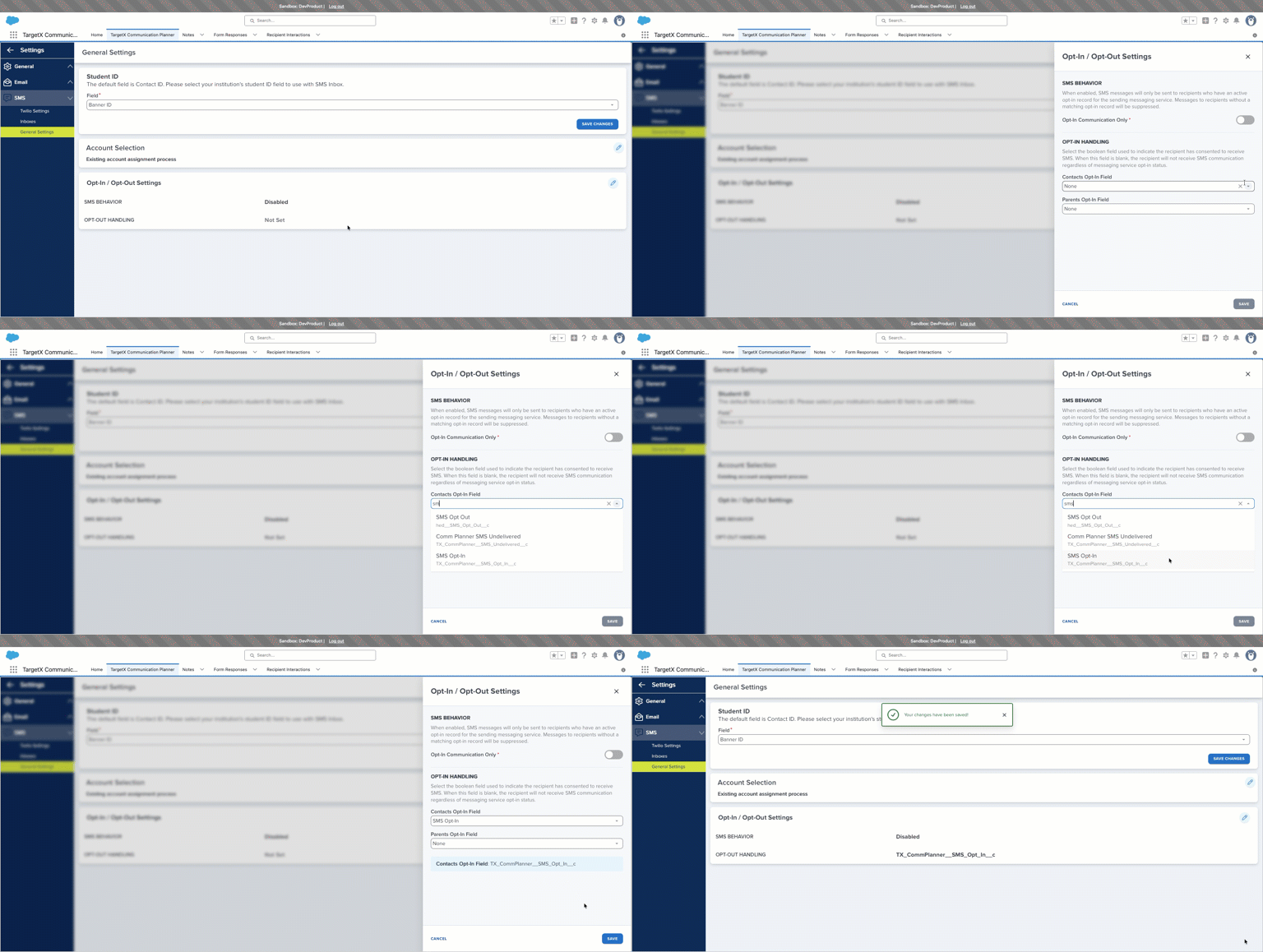
If you currently use a field to store SMS consent in a checkbox field on the Contact or Parent record, you can use that field in the Communication Planner SMS consent settings. Selecting the field in settings (as shown below) is the final step after installing the January 27 package.
Selecting the SMS consent field to indicate SMS opt-in will ensure that SMS sending from the Communication Planner remains uninterrupted.
What if I am currently tracking SMS opt-out?
If you currently track SMS opt-out status (for example, a field indicating that a customer has unsubscribed), we recommend updating your data model to track SMS opt-in consent instead. In most cases, a simple checkbox formula field can convert existing data (e.g., checkbox = false, or Picklist value = Value A) to meet this requirement.
Existing records could also be updated via Salesforce Data Loader, Informatica, Flows, or other automation tools so that the field accurately reflects customers who have provided permission to receive SMS messages.
If You Do Not Currently Capture SMS Consent or Lack of Consent
Option 1: create an SMS opt-in checkbox field now and populate it for Contacts or Parents who should be considered opted in.
Option 2: wait for the January release and use the new Global SMS Opt-In field, updating it based on criteria to determine whether a recipient should receive SMS messages.
If You Use a Non-Checkbox Field
If your current SMS consent field is not a checkbox, you will need to create a checkbox field and populate it based on your existing SMS consent data. You can update it using Salesforce Data Loader, Salesforce Flow, Informatica, or a formula or automation indicating that a Contact or Parent has consented to receiving SMS.
Next Steps
- If you are planning to install the January 2027 release right away and you send SMS out of the Communication Planner, you will need to select the field that indicates consent to receive SMS for Contacts and Parents.
- Make a plan for capturing SMS opt-in in your CRM for contact and parent records in preparation for the winter release.
- If you capture a global ‘opt-out’ for SMS, update your field so it reflects a Contact ‘opting in’.
- If you do not capture opt-in for SMS yet and want to use the Communication Planner provided field, that will be available in January.
- Enable Advanced Opt-In in your Twilio account in preparation for the winter release.
- TargetX Communication Planner Opt-Out management will automatically create and update records of messaging-service opt-in and opt-out activity on a new child object: Messaging Subscriptions. For this to work as expected, admins will need to enable ‘Advanced Opt-In’ settings in their Twilio account. If your Twilio account is managed through TargetX support, please open a support ticket to confirm that it has been enabled.
Additional details and implementation guidance will be provided closer to release. We encourage organizations to review their current SMS consent processes now and determine which opt-in field they intend to use.