
Release 4 – May 3, 2026
New Features and Enhancements
Cross-Portal Enhancements
Disclaimer: on rare occasions, a new feature or enhancement may be moved to a future release or otherwise subject to change.
New Combined Race and Ethnicity Question Block
This enhancement must be approved by the CAS association or UniCAS client for use in the next cycle. If activated, this enhancement will be available for all participating programs in the next cycle. CAS association and UniCAS clients: contact a member of your account team for more information or to enable this feature.
In March 2024, the US Office of Management and Budget (OMB) published a set of revisions to Statistical Policy Directive No. 15: Standards for Maintaining, Collecting, and Presenting Federal Data on Race and Ethnicity (SPD 15). These revisions include:
- Collecting data using a single combined race and ethnicity question, allowing multiple responses.
- Adding Middle Eastern or North African (MENA) as a minimum reporting category, separate and distinct from the White category.
- Allowing the collection of more detail beyond the minimum race and ethnicity reporting categories.
These changes enhance the ability to compare information and data across federal agencies and aim to understand how well federal programs serve a diverse America. Liaison's suite of products support these new race and ethnicity revisions and allow CASs to use them when collecting race and ethnicity data from applicants.
CAS Applicant Portal
CASs can choose from two versions of the new combined race and ethnicity question: one that allows only major-category selections and another that includes subcategory selections (with the option to write in responses). Note that subcategory options cannot be customized.
Only major category selections
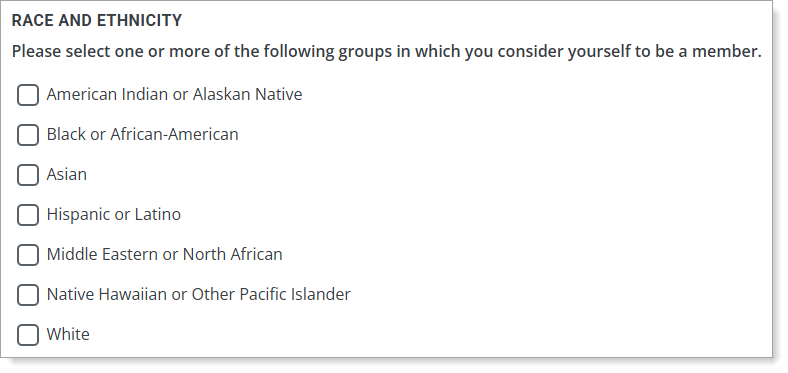
Including subcategory selections and write-in responses

CAS API
The CAS API has been enhanced to support the new combined race and ethnicity blocks. See the Simplifying Federal Change: How Liaison Supports Compliance and Adaptation page for detailed instructions, including details on the new end points and a data dictionary file for the new fields.
Liaison Analytics
The Demographic dashboards and filters will automatically be updated to accept the new combined race and ethnicity major categories (subcategories are not included in any Dashboards).
Liaison Outcomes
If your CAS uses the new combined race and ethnicity block, and you include race and ethnicity data in any reports, exports, or segments, you will need to update them to point to the new field and values. See the Simplifying Federal Change: How Liaison Supports Compliance and Adaptation page for detailed instructions, including a data dictionary file for the new fields.
WebAdMIT
If your CAS uses one of the new combined race and ethnicity questions, note that the existing Applicant Ethnicities field grouping will be removed from and the new Applicant Race and Ethnicity field grouping will be added to the List Manager, Export Manager, and Applicant Header. You may need to update existing templates and data imports for these new fields. See the Simplifying Federal Change: How Liaison Supports Compliance and Adaptation page for detailed instructions, including a data dictionary file for the new fields.
Note that the new combined race and ethnicity questions are not available in Scoring (the separate legacy race and ethnicity questions are).
For the Report Manager, all race and ethnicity-related reports will automatically be updated to accept the new combined race and ethnicity major categories (subcategories are not included in any reports). Additionally, note the change in behavior for the Hispanic or Latino category:
- When using the separate legacy race and ethnicity questions, Hispanic or Latino is considered an ethnicity, and all other categories are races. If an applicant selects both Hispanic or Latino and another major race category, they are only reported in the Hispanic or Latino category in reports. This is known as the IPEDS "trumping rules."
- When using the new combined race and ethnicity question, Hispanic or Latino is considered a major race category. If an applicant selects both Hispanic or Latino and another major race category, they will either be reported in a Multiple category or, for reports that ignore two or more race categories, in each major category they select.
Finally, note that the Hispanic (Yes / No / Blank) field, which distinguishes between applicants who responded "no" versus those who did not select an answer, is only available for the legacy Ethnicity question and is not available for CASs that use the new combined Race and Ethnicity question.
Preferred First Name Available as Email Token
This enhancement must be approved by the CAS association or UniCAS client for use in the next cycle. If activated, this enhancement will be available for all participating programs in the next cycle. CAS association and UniCAS clients: contact a member of your account team for more information or to enable this feature.
You can now use the applicant's preferred first name instead of their legal first name when sending emails through WebAdMIT and Liaison Outcomes (available by request). This allows you to communicate with applicants who may go by a different first name (for example, their legal name is a deadname). Note the following behaviors:
- The CAS Applicant Portal must use the standard My Name question.
- If an applicant does not enter anything in the My Name question, then their legal first name will automatically populate into the preferred first name email token.
Annual Spring Lookup Updates
This enhancement is automatically available for use by all CASs and participating programs. No action is required on the part of any association, school, or program. Contact a member of your account team for more information.
Many fields in the CAS Applicant Portal contain predefined answer values that applicants can select; for example, the Country and County fields both have predefined answer values. These values are housed in shared "lookup tables." Periodically, we update these tables to include additional response options.
The Master High School List has been updated, including the high school CEEB codes from the College Board. Review the Shared Lookup Table Updates page for a full list of updates.
These lookup table updates impact the following portals, some of which you may use. If you created a "crosswalk" from our portals to your local data in your SIS/CRM, you may need to update this crosswalk for the newly-added options. For guidance on the optimal implementation of the new values, review the Shared Lookup Table Updates page.
CAS Applicant Portal Enhancements
Disclaimer: on rare occasions, a new feature or enhancement may be moved to a future release or otherwise subject to change.
Submission Workflow for CASs with No Application Fees
This enhancement must be approved by the CAS association or UniCAS client for use in the next cycle. If activated, this enhancement will be available for all participating programs in the next cycle. CAS association and UniCAS clients: contact a member of your account team for more information or to enable this feature.
For CASs that do not collect application fees from applicants, a new submission workflow is available that removes any mention of payment. Applicants only need to confirm the programs they want to submit to, then click Submit. This streamlines and simplifies the submission process.

The Payment History section under the Applicant Menu (person icon) has also been removed to avoid any confusion around payments.