
Liaison Academy Roles
LearnUpon offers three primary options for Roles: Admin, Manager, and Learner. Each can include various settings depending on what that role needs to accomplish.
Administrator
We currently use two types of Administrators:
- Admins have full access to the system, including Portal Settings.
- Admin ‘Lite’ has full access to the system, except for Portal Settings. These admins can create and maintain user accounts and can upload and maintain course content.
They can’t set up the portal, or change portal-wide settings. This is used for the E&K team, the TargetX Services team and Premier Education.
- For additional information, see the LearnUpon help article User types and permissions: administrators.
Manager
We use the Manager role for TargetX Institution Group Managers (formerly ‘Unit Managers’)
- These are users at TargetX institutions who manage their institution’s users.
- For additional information, see the LearnUpon help article Collection: user types and permissions.
Notes:
- When you upload a group of managers, not all settings are enabled. You’ll need to update the settings as follows:

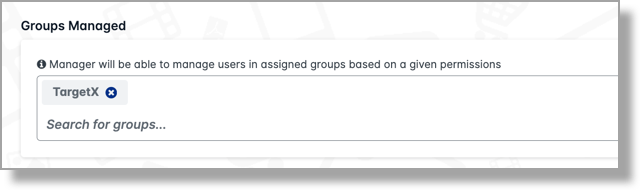
- The Groups tab should indicate the Groups Managed as the user’s institution:
Internal Training Administrator (i.e., 'Training Managers')
Internal Training Administrators are internal Liaison staff who need to assign training during implementation. These users are initially created in Salesforce and then configured manually in LearnUpon. Their permissions are defined as Admin ‘Lite’.
Creating Internal Training Administrators
To create an Internal Training Administrator, you must first create the person in Salesforce:
- Follow the steps outlined in Salesforce Integration (TargetX Users).
- Locate and click the user in LearnUpon.
- Select Settings.
- Change the Type of User to Admin (‘Can access portal settings’ should be disabled).
Training Managers can do the following:
- Add new Contacts in Salesforce.
- Assign and unassign training to users and Groups.
- Deactivate users
- From the LearnUpon tab in Salesforce:
- Assign Training to TargetX users.
- Update Name information*
- For more information, see the Help Center article Training Manager Functions (Employees).
Syncing Contact information in LearnUpon (e.g. Name changes)
Administrators or Managers should follow these steps after Contact information has been updated in Salesforce. Note: managers can only complete these steps for the users they manage:
- Navigate to Users in LearnUpon.
- Search for the User and click the name.
- Click the Sync Contact Info button:

Note: you must refresh the page to view the update.
Internal Training Administrators User Settings
|
Option |
Setting |
|---|---|
| Type of User | Admin |
| Can delete users? | No |
| Can unenroll learners from courses, learning paths and learning journeys? | Yes |
| Can move users between groups? | Yes |
| Can enroll learners on courses, learning paths and learning journeys? | Yes |
| Can manually mark learners as complete? | Yes |
| Group Permissions | |
| Can create users in the following group(s) that they manage |
No |
| Can approve enrollments in the following group(s) that they manage | No |
| Additional Permissions | |
| Add instructor's permissions to manager |
No |
| Register learners to sessions | NA |
| Groups | |
| Groups they belong to |
TargetX |
| Groups they manage | TargetX |
Note: with these settings, the Training Manager can assign courses/learning journeys to their Group(s), so any new user added will automatically get those courses. Once courses are added to a Group, they can not be removed from the group; only an Admin can do that.
Related Documentation
Institution Group Manager
Institution Group Managers (formerly ‘Unit Managers’) are users at TargetX institutions who manage their institution’s users by:
- Adding and deactivating users.
- Assigning and unassigning training.
- Reporting on learner progress.
Creating Institution Group Managers
Removing Institution Group Managers
Institution Group Manager User Settings
|
Option |
Setting |
|---|---|
| Type of User | Manager |
| Can delete users? | No |
| Can unenroll learners from courses, learning paths and learning journeys? | Yes |
| Can move users between groups? | No |
| Can enroll learners on courses, learning paths and learning journeys? | Yes |
| Can manually mark learners as complete? | No |
| Group Permissions | |
| Can create users in the following group(s) that they manage |
No |
| Can approve enrollments in the following group(s) that they manage | No |
| Additional Permissions | |
| Add instructor's permissions to manager |
No |
| Register learners to sessions | NA |
| Groups | |
| Groups they belong to |
TargetX, Institution Group Manager, Account they are linked to in SF |
| Groups they manage | TargetX, Account they are linked to in SF |
Notes:
- With these settings, the Institution Group Manager can assign courses/learning journeys to their Group(s), so any new user added will automatically get those courses.
- Once courses are added to a Group, they can NOT be removed from the group; only an Admin can do that.
Related documentation
Learners
- Self-registered users (not TargetX users) are Learners with Login Enabled and an email address. No specific Settings are needed for these Learners.
- Salesforce integrated users are TargetX users and will display in the User list with the Salesforce icon next to their name. These users will also have Login Enabled and an email address but will also be part of a Group which matches the Account they are associated with in Salesforce.