Liaison

Release 8 – August 30, 2026

New Features and Enhancements

Cross-Portal Enhancements

Liaison's suite of portals work together to help you collect and manage applications. The CAS application, also referred to as the CAS Applicant Portal, is the system where applicants find and apply to your programs. You receive these applications in WebAdMIT or Liaison Outcomes, where you perform your review processes. The appearance of your program and your requirements are customized in the CAS Configuration Portal, where you establish the program-specific elements that your applicants will interact with. Additionally, your program may use one or more of the following tools and platforms:

  • API: a data integration tool.
  • CAS Applicant Gateway: a platform for applicants who have already submitted their CAS application to complete and upload additional materials requested by their programs.
  • CAS Liaison Analytics and Othot: advanced analytics solutions and data reporting tools.
  • CAS Liaison Letters: a platform for evaluators to submit their letters of recommendation.
  • Enrollment Marketing and TargetX: customer relationship management (CRM) systems for student lifecycle management.
  • Living Profile: a platform where students can connect their academic pursuits with their career aspirations.
  • SlideRoom: a platform for collecting digital portfolios.
  • Time2Track: a platform for tracking, verifying, and managing experiences.

Disclaimer: on rare occasions, a new feature or enhancement may be moved to a future release or otherwise subject to change.

Annual Fall Lookup Updates

This enhancement is automatically available for use by all CASs and participating programs. No action is required on the part of any association, school, or program. Contact a member of your account team for more information.

Many fields in the CAS Applicant Portal contain predefined answer values that applicants can select; for example, the Country and County fields both have predefined answer values. These values are housed in shared "lookup tables." Periodically, we update these tables to include additional response options.

The new lookup table values include updates to AP exams, colleges, counties, degrees, and majors. Review the Shared Lookup Table Updates page (linked below) for a full list of updates.

These lookup table updates impact the following portals, some of which you may use. If you created a "crosswalk" from our portals to your local data in your SIS/CRM, you may need to update this crosswalk for the newly-added options. For guidance on the optimal implementation of the new values, review the Shared Lookup Table Updates page.

CAS Applicant Portal Enhancements

Disclaimer: on rare occasions, a new feature or enhancement may be moved to a future release or otherwise subject to change.

Identify Lab and Lecture Courses During Professional Transcript Entry (PTE) Approval Process

For CASs on the CAS 3+ platform that use Professional Transcript Entry (PTE), this enhancement is automatically available for use. No action is required on the part of any association, school, or program. Contact a member of your account team for more information.

Some CASs allow applicants to identify if their science coursework is considered lab only or lecture with lab. For these CASs that also use the Professional Transcript Entry (PTE) feature (where Liaison's PTE team enters an applicant's coursework on their behalf), applicants can now identify their lab and lecture coursework during the PTE approval process. Previously, applicants could not do this without contacting customer service. This enhancement ensures that applicants can fully review and edit their coursework within the application.

RN CAS App Portal PTE Lab Lecture Aug 2026.png

Liaison Outcomes Enhancements

The following enhancements are now available in Liaison Outcomes. If you have any questions about these features, contact a member of your account team or support.

Disclaimer: on rare occasions, a new feature or enhancement may be moved to a future release or otherwise subject to change.

Application Touchpoints Now Available in Segments

Starting September 7, this enhancement is automatically available for use by all CASs and participating programs. No action is required on the part of any association, school, or program. Contact a member of your account team for more information.

You can now use application touchpoints when building segments from the Applications Grid. This enhancement helps you identify applications based on activity like emails, texts, and other communication related to the application. It also helps isolate applications that had phase changes during a specific time frame, even if they've since moved to another phase.

This type of segmenting helps you target campaigns and Quick Messages to more specific groups of applicants.

Funnel Stage Change Touchpoints

Starting September 7, this enhancement is automatically available for use by all CASs and participating programs. No action is required on the part of any association, school, or program. Contact a member of your account team for more information.

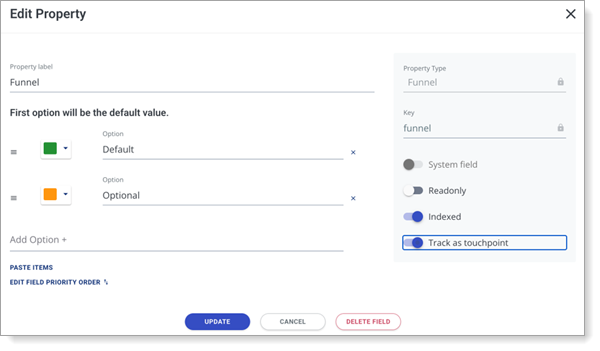
Funnel stage changes can now be tracked as touchpoints, making it easier to understand and segment contacts based on their movement through the enrollment funnel. To make this work, first configure a funnel property to be tracked as a touchpoint.
RN Outcomes Track as Touchpoint Aug 2026.png

Then, changes to that property are recorded in Contact Activity and can be used when building segments. You can identify contacts who moved into a specific funnel stage during a selected timeframe, even if they have since moved to another stage.

This enhancement provides greater visibility into how contacts progress through the funnel and can help you target follow-up communications based on recent movement.

Building Contact Segments Based on Payment Activity

Starting September 7, this enhancement is automatically available for use by all CASs and participating programs. No action is required on the part of any association, school, or program. Contact a member of your account team for more information.

You can now use payment activity touchpoints when building contact segments. This allows you to identify contacts based on payment activity and combine payment criteria with other contact touchpoints when creating targeted segments.

New Documentation for Outcomes

Please review the list of new and updated documentation, all accessible in the Liaison Outcomes Help Center.

Document

Details

Prelaunch Environment Reference Guide

Liaison's products, including the CAS Applicant Portal, CAS Configuration Portal, and Liaison Outcomes, have several environments available to you, depending on your needs.

This reference guide focuses on the prelaunch environment, where you'll configure your programs in the CAS Configuration Portal for launch in the CAS Applicant Portal. Note that this guide is also available in the CAS Configuration Portal Help Center.

Setting Up Single Sign-On

Outcomes now lets your team set up single sign-on (SSO) without needing to work through Liaison staff. Review Setting Up Single Sign-On to learn how your IT team can configure and test SSO directly in Outcomes.

Coming Soon!

Please review the list of upcoming events, including product updates and regional training opportunities.

Event

Date

Details

CAS 3+ Upgrade

2026

Liaison is excited to announce that in the 2026-2027 application cycle, all of our Centralized Application Services (CAS) will be upgraded to a new, mobile-first, and modern applicant portal that we call CAS 3+. Visit the CAS 3+ Upgrade page to learn more about its key benefits and a preview of the upgraded application.

Shared Lookup Table Updates for Fall 2026

August 2026

Many fields in the CAS Applicant Portal contain predefined answer values that applicants can select; for example, the Country and County fields both have predefined answer values. These values are housed in shared "lookup tables" which are viewable in your CAS's/UniCAS's data dictionary file.

Lookup table change requests can be sent to a member of your account team, who will compile and review these requests. New lookup table values will appear in the CAS Applicant Portal in August 2026 (subject to change).

Visit the Shared Lookup Table Updates page for more information.

Shared Lookup Table Updates for Spring 2027

March 2027

Many fields in the CAS Applicant Portal contain predefined answer values that applicants can select; for example, the Country and County fields both have predefined answer values. These values are housed in shared "lookup tables" which are viewable in your CAS's/UniCAS's data dictionary file.

Lookup table change requests can be sent to a member of your account team, who will compile and review these requests. New lookup table values will appear in the CAS Applicant Portal in March 2027 (subject to change).

Visit the Shared Lookup Table Updates page for more information.


  • Was this article helpful?