
Release 6 – June 28, 2026
New Features and Enhancements
CAS Applicant Portal Enhancements
Disclaimer: on rare occasions, a new feature or enhancement may be moved to a future release or otherwise subject to change.
Prevent Saving Date of Birth for Ages Less Than 12 and Greater Than 100
For CASs that use date of birth questions with validation messages, this enhancement is automatically available for use. No action is required on the part of any association, school, or program. Contact a member of your account team for more information.
Some CASs ask a date of birth question that includes a validation message, which calculates the applicant's current age. With this enhancement, if an applicant enters a date of birth that results in a calculated age less than 12 or greater than 100, they cannot save their entry and must enter a new date of birth. This enhancement helps prevent applicants from entering improbable ages.

Optional Custom Message on Payment Submission Confirmation Page
For CASs on the CAS 3+ platform, this enhancement must be approved by the CAS association or UniCAS client for use in the current cycle. If activated, this enhancement is available for all participating programs. CAS association and UniCAS clients: contact a member of your account team for more information or to enable this feature.
CASs can now include a custom message on the payment submission confirmation page. This may be helpful if a CAS wants to encourage applicants for next steps (e.g., contact programs directly for questions, track transcripts and letters of recommendation under Academic Records, etc.).

Customize CAS Status Bar and Application Status Descriptions
For CASs on the CAS 3+ platform, this enhancement must be approved by the CAS association or UniCAS client for use in the current cycle. If activated, this enhancement is available for all participating programs. CAS association and UniCAS clients: contact a member of your account team for more information or to enable this feature.
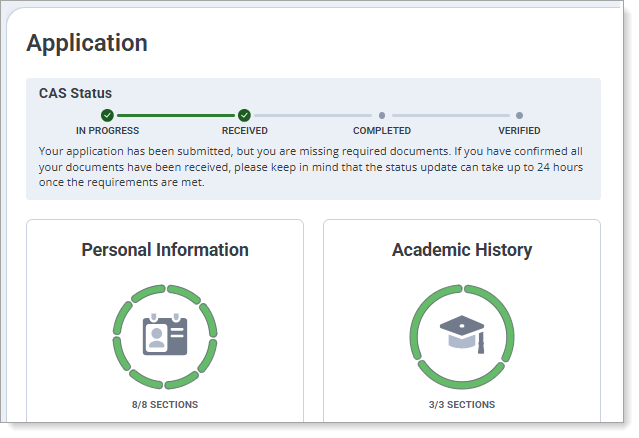
CASs on the CAS 3+ platform can now customize the name of the CAS Status bar and add description text for the In Progress, Received, Complete, and Verified (if applicable) application statuses. This allows CASs to emphasize their unique requirements for application statuses, such as requiring transcripts, letters of recommendation, test scores, etc.
Customize Coupon Code Label
For CASs on the CAS 3+ platform that offer coupon codes, this enhancement must be approved by the CAS association or UniCAS client for use in the current cycle. If activated, this enhancement is available for all participating programs. CAS association and UniCAS clients: contact a member of your account team for more information or to enable this feature.
Some CASs offer coupon codes (also known as "fee waiver codes"), where a program buys coupons from the CAS and gives them to applicants to help offset the application fee. With this enhancement, all CASs on the CAS 3+ platform will have "fee waiver codes" automatically renamed to "coupon codes"; they can also customize the "coupon code" label to another preferred name. This helps CASs who may want to use or avoid different industry terms within the application.

View Prerequisites Link on Transcript Entry Page
This enhancement is automatically available for use by all CASs on the CAS 3+ platform. No action is required on the part of any association, school, or program. Contact a member of your account team for more information.
For CASs on the CAS 3+ platform that also allow programs to configure prerequisites, applicants now see a blue informational box with a View Prerequisites link on the Transcript Entry page. This alerts applicants that some of their programs may require them to match their coursework to prerequisites. Applicants can then click the View Prerequisites link, which opens a new window listing each program and its prerequisites. This enhancement notifies applicants early in the application process of program requirements and future prerequisite matching.

Professional Transcript Entry Fees using PayPal Advanced Checkout
For CASs that use the Professional Transcript Entry (PTE) service, this enhancement will be automatically activated in the next cycle. No action is required on the part of any association, school, or program. Contact a member of your account team for more information.
Some CASs offer applicants the Professional Transcript Entry (PTE) service, where applicants can pay to have Liaison’s PTE team enter the applicant's coursework on their behalf. For CASs that offer this, starting in the CAS's next cycle, applicants can pay the PTE fee using PayPal Advanced Checkout, a feature-rich checkout experience available within PayPal Complete Payments (PPCP). Advantages for Liaison, our customers, and CAS applicants of using PayPal Advanced Checkout over PayFlow Pro include:
- Simplified PCI Compliance: Advanced Checkout uses hosted, embedded fields, meaning customer payment data passes directly to PayPal rather than through Liaison's servers, reducing our security burden.
- Modern Payment Options: Advanced Checkout provides easy access to additional payment methods like Venmo in addition to credit cards and PayPal.
- Better Mobile Experience: Checkout pages are optimized for use on phones and mobile devices to better support modern user behavior.
Note that PayPal considers PayFlow Pro a legacy product and is encouraging customers to transition to PPCP.