
Cycle 2026–2027 Updates
Enhancements Overview
|
Release Date |
Release Highlights |
|---|---|
| September 3, 2026 |
Interview Portal |
| July 20, 2026 |
Interview Portal Program Portal |
| July 1, 2026 |
Program Portal Interview Portal |
| June 5, 2026 |
Interview Portal
Program Portal |
| May 18, 2026 |
Interview Portal |
| April 22, 2026 |
Program Portal |
| April 6 and 16, 2026 |
Interview Portal
|
| March 6, 2026 |
Program Portal |
Enhancements
September 3, 2026 (Interview Portal)
Send Emails Directly from the Interview Portal
You can now send emails to applicants directly from the Interview Portal, eliminating the need to switch back to the Program Portal. This allows you to send invites to all applicants in the Invited and Ready for Scheduling status directly within the Interview Portal, streamlining your workflow.
You can now choose from two email options:
- Use a saved template: email templates that you've created in the Program Portal are now accessible in the Interview Portal. Select one to quickly send consistent, reusable communications to applicants.
- Compose an ad hoc email: write a new, one-time email directly in the Interview Portal. Ad hoc emails are not saved for future use.
Additionally, emails sent from the Interview Portal are tracked in the Program Portal, just like emails sent directly from the Program Portal.
Enhanced Video Experience: Your Video Settings Now Save
Video settings now save from event to event. Once configured, a user's preferences are automatically remembered when they join another event from the same browser and device. This ensures that all participants are well-prepared the moment they enter the room.
The following settings are saved:
- Theme
- Background
- Participant display name
- Audio settings
- Camera settings
Enhanced Video Experience: Chat in Event Rooms
Event rooms (i.e., meeting rooms and social events) now include a chat feature, giving participants an easy way to communicate without interrupting the event.
The chat function is enabled by default, but can be disabled by clicking the More icon within the chat bubble.

New Event Type: Social Events
You can now create and invite applicants to Social Events that are separate from an applicant’s scheduled interview day. Use Social Events to give applicants additional opportunities to connect with your program through experiences such as:
- Program-wide tours
- Presentations
- Meet and greets
- Informal social gatherings
- Other events for applicants participating in the interview process
When creating a social event, programs can invite applicants in the Interview Scheduled status, making it easy to engage eligible applicants beyond their individual interview schedule.
This provides programs with a flexible way to showcase their culture, connect applicants with faculty and residents, and offer a more complete view of the program experience.
The Meeting Rooms section within the left navigation panel is now named Event Rooms.
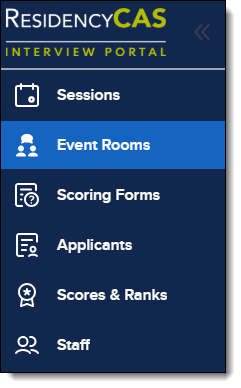
This section comprises both meeting rooms and social events.

For step-by-step instructions on building a social event, review our Using Event Rooms article.
Join Event Rooms Before They Begin
All participants of a meeting room or social event can now join up to 2 minutes before its scheduled start time, at which point the Join button will become available. The event name, and scheduled start and end times are displayed in the room header. This provides clarity on the scheduled times of the event rooms while allowing the flexibility to join the room early.
July 20, 2026 (Interview Portal)
Link Meeting Rooms to Interview Sessions
Users with the Program Manager role in the Interview Portal can now link meeting rooms to interview sessions, eliminating the need to manually assign applicants to corresponding meeting rooms. This streamlines interview-day scheduling and helps ensure applicants are assigned to all activities associated with their interview.
Applicants also benefit from a clearer scheduling experience. During self-scheduling, they can now view their complete interview day, including linked meeting rooms, giving them a more accurate picture of their schedule before they choose a session.
In the Session's Settings, there is now a button to link meeting rooms to it.

When creating meeting rooms, you can also directly link them to specific sessions.

If only some applicants assigned to a session should be included in a linked meeting room, you can modify meeting room assignments from either the Meeting Room Settings or the Session Settings by first turning Automatic Assignments Off.
July 20, 2026 (Program Portal)
New Export Type: Application Summary PDFs
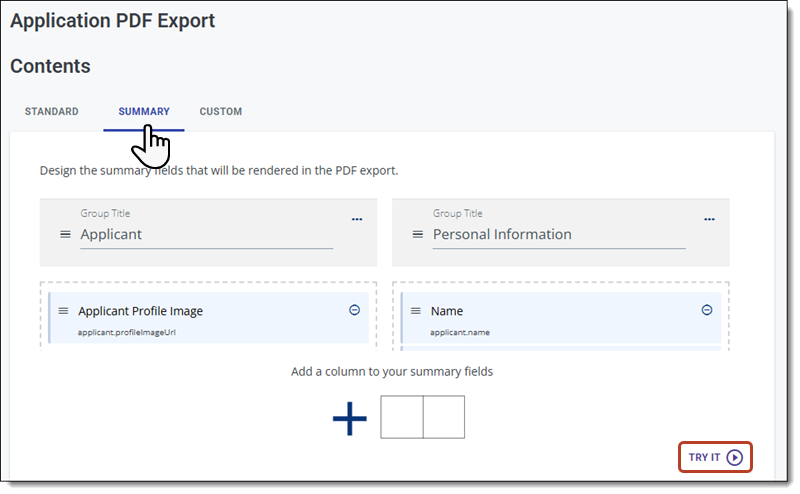
You can now create Application Summary PDFs (i.e., a clinical facesheet) as a PDF export. This allows you to place the headshot and other applicant data on a single page, providing a concise overview of key details during the review and interview processes.

To create a summary, follow the same process you use to configure a PDF export and select the Summary tab to choose the fields and layout.
July 1, 2026 (Program Portal)
Evaluations Now Autosave
When completing application review forms, they now automatically save after every edit. This guarantees that no work is ever lost, allowing you to review applications at your own pace.
From the review panel, you’ll notice a few new features on the review form:
- Draft Status: indicates whether the review is Not Started, a Saved Draft, or Submitted.
- Draft Last Saved Date: when the review was last saved.
- Save Now: while your changes are saved automatically, Save Now provides an extra level of confidence when you want to save your work immediately.

You can access your saved reviews and resume work on them from the Toolbar at the top of the Applications Grid.

Note: in progress reviews are specific to each reviewer. No other user, regardless of their role, can view another user’s drafts or draft statuses. Only submitted reviews are visible to others.
Manage Your Program's Branding
You can now manage your program branding, including the image and description applicants see during the application process, directly in the Configuration Portal. Instead of submitting a branding request form, you can view and update your program's branding yourself, making it faster and easier to keep your program information current.

Enhanced Applicant Activity History
Within the full application, the Activity History section has been redesigned to make it faster and more intuitive to use. You can now search for and filter historical events to quickly find application milestones, reviewer activity, comments, and email communications. You can also view previously sent emails, making it easier to view communication details without leaving the application.

- Search Function: search for keywords related to an activity, such as "email", "review", "phase", or "comment".
- Time Window: choose a timeframe of activity to view.
- Filters: choose from a list of filters to narrow your activity search.
- Email Preview: preview an email sent to the applicant.
- Email History: view the full history of the email sent.
July 1, 2026 (Interview Portal)
Interview Time Restrictions Removed
When creating an interview session and schedule, there are no longer restrictions on session start times or interview durations. The minimum interview duration has been decreased from 5 to 1 minute, and the total interview duration no longer needs to be in 5-minute intervals. This improves scheduling flexibility, as sessions can now start at any point, and the interview time and total interview duration can be as long or short as necessary.
Example of Room Settings for a session that begins at 9:03 AM, with 2-minute interview and 1-minute review durations:

Enhanced Cohort Assignment Flexibility
You can now update applicant cohort assignments before an interview session is full. Previously, cohort assignments could only be changed after all interview slots in the session were filled. This provides greater flexibility when organizing applicants into interview cohorts during scheduling.

June 5, 2026 (Interview Portal)
Enhanced Sequential Waitlist Management
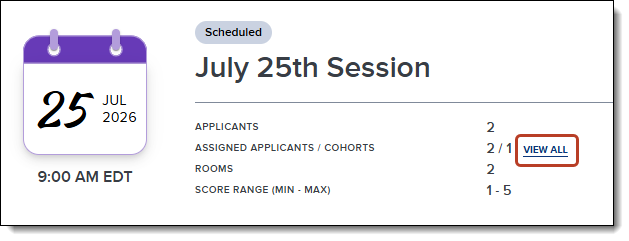
Programs with Sequential Waitlists enabled in their Program Settings can now edit session waitlist orders by accessing Assigned Applicants in the Session Details page, and dragging and dropping them. This allows programs to customize the notification sequence of waitlisted applicants.

Direct Waitlisting for Full Sessions
Applicants can now join the waitlist for full sessions without needing to commit to an open session. Once invited, they have the flexibility to schedule open sessions and/or waitlist for full sessions. They can adjust their choices any time before the applicant deadline. This provides a fully autonomous waitlist process.

Waitlisted Sessions Displayed on Applicant Side Panel
Selecting an applicant in the Applicants section now shows their waitlisted sessions in the side panel, providing a clearer view of their session activity.

June 5, 2026 (Program Portal)
May 18, 2026 (Interview Portal)
Enhanced Session Visibility
The information displayed to users assigned to a session has been expanded to clarify schedule details.
- Interviewers and applicants can now see their scheduled sessions, even if the schedule has not been created. This is indicated by a green dot in their calendar view, along with the session details in their list view. This gives a more accurate representation of all scheduled interviews.
- When session visibility is disabled, scheduled interviewers can still see the session and their assigned applicants on their dashboard. This provides clearer schedules and the ability to hide sessions from unscheduled applicants.
- On the Sessions page, a lock symbol appears next to a session’s date where the Session Management Deadline has passed. On its Session Details page, an alert explains this further. This allows program managers to easily identify sessions that applicants can no longer interact with.


Improved Rank List Functionality
- Rank lists now occupy an entire page, reducing the need to scroll.
- You can now manually enter the rank order of each applicant, in addition to dragging and dropping them, for quick and efficient changes.

Required Final Score Comment
When a program manager enters a final score that differs from the average score, an explanation is now required. This helps track why a score was changed, as the Final Interview Score Comment is an exportable field.

Additional Mandatory Room Available
The number of available Required Rooms For All Applicants per session has increased from 4 to 5, enabling the creation of more complex interview schedules.
April 22, 2026 (Program Portal)
Updated Settings Menu Organization
We've reorganized the Settings Menu to increase clarity and make it easier to navigate. Settings are now grouped more intentionally, with organization-wide (global) items at the top and application- or cycle-related items grouped lower in the menu.
These changes are part of ongoing improvements to how settings are structured, but there is no change to existing functionality. Only the layout and organization of the menu have been updated.
Clerkship Grades Available in the Applicant PDF
Clerkship grades are now included in the application PDF under the Medical Schools Attended section. This change makes it easier to analyze clerkship grades when exporting data from ResidencyCAS. Additionally, you can select these grades when creating a custom export.

April 6 and 16, 2026 (Interview Portal)
New Option to Send Applicant Reminder Emails (April 6)
You can now send a reminder email to applicants remaining in the Invited and Ready for Scheduling status after a specified number of days since their initial invitation.

Mobile and Accessibility Enhancements (April 16)
We have enhanced the experience for mobile and tablet devices while improving accessibility to better support all users. These updates offer a more consistent and user-friendly experience on smaller screens, along with enhancements that ensure compliance with Section 508 standards.