
Release 7 – August 2, 2026
New Features and Enhancements
CAS API Enhancements
The following enhancements are automatically available for the CAS API, and no action is required on the part of any school or program. If you have any questions about these features, contact support.
Disclaimer: on rare occasions, a new feature or enhancement may be moved to a future release or otherwise subject to change.
Enhanced Race and Ethnicity Data in the CAS API
Starting in 2026 Release 4, Liaison began supporting a new combined race and ethnicity question block to align with the US Office of Management and Budget’s (OMB) revised standards. These revisions include:
- Collecting data using a single combined race and ethnicity question, allowing multiple responses.
- Adding Middle Eastern or North African (MENA) as a minimum reporting category, separate and distinct from the White category.
- Allowing the collection of more detail beyond the minimum race and ethnicity reporting categories.
With this enhancement, the CAS API has been updated further to make race and ethnicity data easier to consume and map. The following two new JSON objects are now available under the existing raceAndEthnicities node:
- raceAndEthnicitiesCategories
- raceAndEthnicitiesSubCategories
These objects expose category and subcategory-level values (including the associated category ID for each subcategory) for CASs configured to use race and ethnicity categories and subcategories. This provides a more flexible structure for reporting and downstream integration. Current integrations will continue functioning without change, as this update perserves the existing raceAndEthnicities node for backward compatibility.
Along with this update, the CAS API now includes a new referenceDataId field in each JSON node under the raceAndEthnicity object. This field has been added to the following arrays:
- raceAndEthnicities
- raceAndEthnicitiesCategories
- raceAndEthnicitiesSubCategories
For more information, see the CAS API Swagger documentation.
Support for Legal Sex in POST Biographic Jumpstart API
The POST Biographic Jumpstart API has been enhanced to support the applicant’s legal sex. A new legalSex JSON object is available in the API data contract, with an answerOption property that accepts the following numeric values: 1 = Male, 2 = Female, 3 = Nonbinary (or Custom), and 4 = Declined to state.
When you submit answerOption in the Jumpstart request, the corresponding text value is written to the application’s gender field, which you can verify by calling the GET Application/{id} API. For example, if you pass "answerOption": 1 in the Jumpstart API, the gender node on the application will be populated with "MALE".
This enhancement provides a standardized way to capture legal sex through the modeled gender blocks while continuing to support CASs that collect gender or legal sex via custom questions. For more information, see the CAS API Swagger documentation.
CAS Applicant Portal Enhancements
Disclaimer: on rare occasions, a new feature or enhancement may be moved to a future release or otherwise subject to change.
Chat Icon Relocated and Rebranded
For CASs on the CAS 3+ platform that use the chatbot, this enhancement is automatically available for use. No action is required on the part of any association, school, or program. Contact a member of your account team for more information.
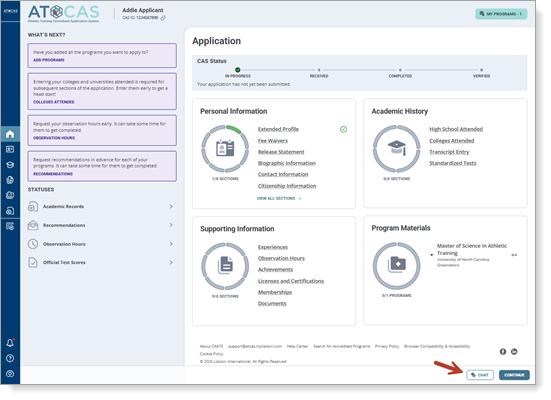
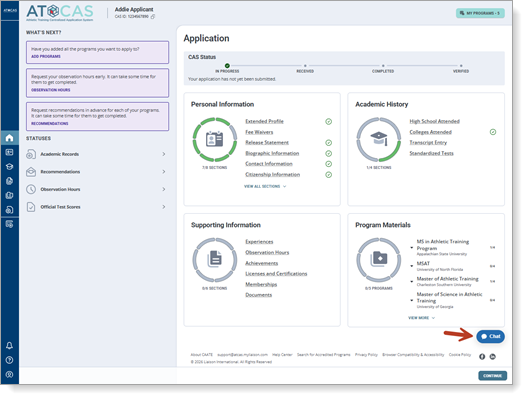
To improve upon the user experience when navigating around the CAS application and accessing Cassie, the CAS chatbot, the chat icon is now available in the footer of the application, next to the Continue button. Previously, it floated above the application in the bottom right corner, which was causing some issues as applicants were completing sections. Additionally, the chat icon now matches the rest of the CAS’s color branding for greater visual consistency.
New location
Previous location
Customize Titles for Unofficial Transcripts/International Evaluations in Academic Records
For CASs on the CAS 3+ platform, this enhancement must be approved by the CAS association or UniCAS client for use in the current cycle. If activated, this enhancement is available for all participating programs. CAS association and UniCAS clients: contact a member of your account team for more information or to enable this feature.
For CASs that have unofficial transcripts collection set at the CAS-level, those CASs can customize the name of the Unofficial Transcripts and Unofficial International Evaluations titles in the Academic Records section. This allows the CAS to use terms or labels that more closely align with what they need from applicants.
Liaison Outcomes Enhancements
The following enhancements are now available in Liaison Outcomes. If you have any questions about these features, contact a member of your account team or support.
Disclaimer: on rare occasions, a new feature or enhancement may be moved to a future release or otherwise subject to change.
New Marketing Dashboard: Sending Metrics and Engagement
Starting August 9, this enhancement is automatically available for use by all CASs and participating programs. No action is required on the part of any association, school, or program. Contact a member of your account team for more information.
Outcomes now has a Sending Activity & Engagement dashboard in the Marketing section. This dashboard provides a centralized view of marketing campaign performance across email, text messaging, and voice campaigns.

With the new dashboard, you can:
- Monitor campaign sending and engagement trends.
- Review key metrics like emails sent, delivered, opened, failed, etc.
- Identify underperforming campaigns.
The dashboard also includes a detailed reporting table that breaks down metrics by campaign track, helping users investigate delivery or engagement issues more efficiently.
Note that the dashboard reporting uses data beginning from April 12, 2026.
Export Event Registrant List to CSV
Starting August 9, this enhancement is automatically available for use by all CASs and participating programs. No action is required on the part of any association, school, or program. Contact a member of your account team for more information.
You can now download a CSV file that includes registrants for any event occurrence directly from the registrants view, including registered guests. When you click the Download registrants to CSV button, Outcomes exports names, emails, event details, registration date/status, and guest counts to a CSV file so you can use the list at in‑person events or load it into other systems for tracking and follow‑up.
Copyable Reference Portal Link for Individual Requestees
Starting August 9, this enhancement is automatically available for use by all CASs and participating programs. No action is required on the part of any association, school, or program. Contact a member of your account team for more information.
You can now copy a direct, secure link to the reference portal for a specific reference request, making it easier to help recommenders who cannot access the original email. From the application view, a new Copy link button appears on each reference form record for users with Manage Reference Portal access, allowing you to paste the tokenized link to share as needed.
This enhancement streamlines troubleshooting when references have email delivery issues or need a new way to reach the portal, while preserving secure access to the correct recommendation form.
Additional Ability to Segment Contacts Using Touchpoints
Starting August 9, this enhancement is automatically available for use by all CASs and participating programs. No action is required on the part of any association, school, or program. Contact a member of your account team for more information.
Outcomes now allows users to leverage touchpoints directly within the Segment Builder, making it easier to identify and report on contacts and applications based on key interactions throughout the student journey. Highlights of this enhancement include:
- The ability to filter contacts and applications by touchpoint activity, including:
- Marketing emails, text messages, and voice messages
- Event registrations and check-ins
- Inquiry form submissions
- Application starts
- Application stage and phase changes
- The ability to further refine segments using:
- Touchpoint actions (e.g., Delivered, Opened, Registered)
- Campaigns and tracks
- Individual communication items
- Custom date ranges
These enhancements give you greater visibility into engagement trends and make it easier to build targeted audiences for reporting, outreach, and enrollment analysis.
ResidencyCAS Interview Portal Enhancements
Link Meeting Rooms to Interview Sessions
Users with the Program Manager role in the Interview Portal can now link meeting rooms to interview sessions, eliminating the need to manually assign applicants to corresponding meeting rooms. This streamlines interview-day scheduling and helps ensure applicants are assigned to all activities associated with their interview.
Applicants also benefit from a clearer scheduling experience. During self-scheduling, they can now view their complete interview day, including linked meeting rooms, giving them a more accurate picture of their schedule before they choose a session.
In the Session's Settings, there is now a button to link meeting rooms to it.

When creating meeting rooms, you can also directly link them to specific sessions.

If only some applicants assigned to a session should be included in a linked meeting room, you can modify meeting room assignments from either the Meeting Room Settings or the Session Settings by first turning Automatic Assignments Off.
ResidencyCAS Program Portal Enhancements
New Export Type: Application Summary PDFs
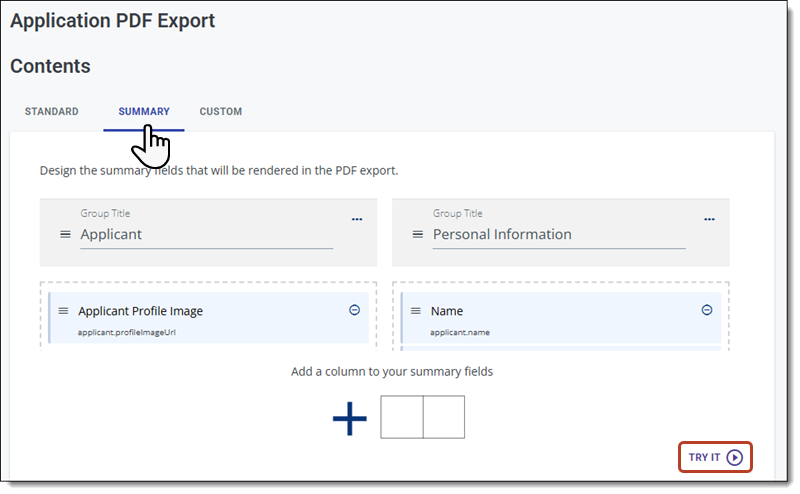
You can now create Application Summary PDFs (i.e., a clinical facesheet) as a PDF export. This allows you to place the headshot and other applicant data on a single page, providing a concise overview of key details during the review and interview processes.

To create a summary, follow the same process you use to configure a PDF export and select the Summary tab to choose the fields and layout.
Time2Track Enhancements
The following enhancements are automatically available for Time2Track (unless otherwise noted), and no action is required on the part of any association, school, or program. If you have any questions about these features, contact your Account Manager or customer service.
Want to be notified about new enhancements? Subscribe to Release Notes emails.
Disclaimer: on rare occasions, a new feature or enhancement may be moved to a future release or otherwise subject to change.
Enhancements for 2026-2027 AAPI Cycle
For the AAPI 2026-2027 cycle, which launched on July 15, the following changes have been made:
Student View
- New “I do not have any integrated reports” option added to Integrated Reports under Summary of Practicum Experiences.
- “Number of Hours Anticipated” label has been updated to “Number of Hours Anticipated (Intervention + Assessment + Supervision + Support)”.
DCT View
- Regionally accredited questions have been removed from the Doctoral Program Accreditation Status under the DCT Submission.
- The Evaluation of Student section has been updated to include “If ‘No’, please explain” conditionally required question for each set of questions.
- DCT Submissions has been updated to allow DCTS to configure default responses for standard questions. When enabled, the responses are automatically pre-populated for each applicant and allow the DCT to review and change answers where needed.
Student View & DCT View
- The Practicum Hours Completion Date was updated to October 1, 2026.
- The Exam Completion Date was updated to February 1, 2027.
- The Coursework Completion Date was updated to June 30, 2027.
Transfer Planner Enhancements
The following enhancements are now available in CSU Transfer Planner Student and Campus (i.e., University and Community College) Portals. If you have any questions about these features, contact a member of your account team or support.
CSU Transfer Planner Campus (i.e., University and Community College) Portals are built upon the Liaison Outcomes product, and so where you see "Outcomes" listed below, it applies to CSU Transfer Planner as well.
Disclaimer: on rare occasions, a new feature or enhancement may be moved to a future release or otherwise subject to change.
Student & Campus Portals: Transfer Success Pathway Period Starts
The new Transfer Success Pathway period opens up on August 1. Additionally, review the 2026 Release 6 notes for more information about the updated TSP Questionnaire.
WebAdMIT Enhancements
The following enhancements are now available in WebAdMIT. If you have any questions about these features, contact a member of your account team or support.
Disclaimer: on rare occasions, a new feature or enhancement may be moved to a future release or otherwise subject to change.
WebAdMIT Automation for Local Statuses
This enhancement must be approved by the CAS association or UniCAS client for use in the current cycle. If activated, this enhancement is available for all participating programs. CAS association and UniCAS clients: contact a member of your account team for more information or to enable this feature.
WebAdMIT now offers a new Automation feature that automatically moves applicants into your Local Statuses based on criteria you set. For example, you can set that when an applicant applies to your program and is in the Verified application status, the applicant will automatically move into an Application Received Local Status. Then, using the Local Status feature, you can program the Local Status to automatically send an email template that includes a welcome message and key details about your program and requirements.
This automation feature simplifies your workflow so that you can perform fewer manual tasks in managing your applicant pool. Review the Creating Automations article to learn more about this feature and example scenarios.
Liaison Analytics Information Page
For CASs that allow users to access Liaison Analytics, this enhancement is automatically available for use. No action is required on the part of any association, school, or program. Contact a member of your account team for more information.
For CASs that allow users to access Liaison Analytics directly from WebAdMIT, the Liaison Analytics link in the Menu Bar now directs you to a page explaining what Liaison Analytics is, a link to its help center, and a link to Liaison Analytics. This helps you understand more about the Liaison Analytics product and how you can use it within your admissions process.
Observation Hours One-to-Many Fields in Export Manager
This enhancement is automatically available for use by all CASs and participating programs. No action is required on the part of any association, school, or program. Contact a member of your account team for more information.
Certain fields in the application allow applicants to enter more than one answer; for example, an applicant can have one experience, five experiences, or more. These are called “one-to-many” fields in WebAdMIT, and when you export these one-to-many fields, the data will appear in repeated columns with numeric suffixes (e.g., experience_name_0, experience_name_1, etc.).
Currently, if an applicant has more than one response for the following fields, the data does not populate in repeated columns as normal one-to-many fields do; instead, only one column of data is populated:
- Observation Hours field grouping > Address 2 field
Starting in early August 2026, these fields will export correctly as one-to-many fields. If your CAS uses these fields in exports and you previously downloaded this data, you should plan to re-download it to ensure that you are capturing all of the applicant's data.
Note that this data has always appeared correctly when viewing the Applicant Details page or running lists in the List Manager.
Coming Soon: Internships & Clinical Experiences One-to-Many Fields in Export Manager
This enhancement is automatically available for use by all CASs and participating programs. No action is required on the part of any association, school, or program. Contact a member of your account team for more information.
Certain fields in the application allow applicants to enter more than one answer; for example, an applicant can have one experience, five experiences, or more. These are called “one-to-many” fields in WebAdMIT, and when you export these one-to-many fields, the data will appear in repeated columns with numeric suffixes (e.g., experience_name_0, experience_name_1, etc.).
Currently, if an applicant has more than one response for the following fields, the data does not populate in repeated columns as normal one-to-many fields do; instead, only one column of data is populated:
- Internships & Clinical Experiences field grouping > Country ISO 3 Code field
Starting in late August 2026, these fields will export correctly as one-to-many fields. If your CAS uses these fields in exports and you previously downloaded this data, you should plan to re-download it to ensure that you are capturing all of the applicant's data.
Note that this data has always appeared correctly when viewing the Applicant Details page or running lists in the List Manager.
New Documentation for Outcomes
Please review the list of new and updated documentation, all accessible in the Liaison Outcomes Help Center.
|
Document |
Details |
|---|---|
| Setting Up Single Sign-On |
Outcomes now lets your team set up single sign-on (SSO) without needing to work through Liaison staff. Review the Setting Up Single Sign-On to learn how your IT team can configure and test SSO directly in Outcomes. |
Ongoing Maintenance
Please review the list of scheduled downtime/maintenance and product updates.
|
Event |
Date |
Details |
|---|---|---|
|
Sandbox Environment Refresh |
July 30, 2026 |
The WebAdMIT Sandbox environment (uat.webadmit.org) was refreshed with current (cleansed) production data and program configurations. Any test exports, custom fields, etc., in the current sandbox were overwritten. The next sandbox environment refresh is scheduled for August 27, 2026. |
Coming Soon!
Please review the list of upcoming events, including product updates and regional training opportunities.
|
Event |
Date |
Details |
|---|---|---|
|
CAS 3+ Upgrade |
2026 |
Liaison is excited to announce that in the 2026-2027 application cycle, all of our Centralized Application Services (CAS) will be upgraded to a new, mobile-first, and modern applicant portal that we call CAS 3+. Visit the CAS 3+ Upgrade page to learn more about its key benefits and a preview of the upgraded application. |
|
Shared Lookup Table Updates for Fall 2026 |
August 2026 |
Many fields in the CAS Applicant Portal contain predefined answer values that applicants can select; for example, the Country and County fields both have predefined answer values. These values are housed in shared "lookup tables" which are viewable in your CAS's/UniCAS's data dictionary file. Lookup table change requests can be sent to a member of your account team, who will compile and review these requests. New lookup table values will appear in the CAS Applicant Portal in August 2026 (subject to change). Visit the Shared Lookup Table Updates page for more information. |