
Release 8 – August 30, 2026
New Features and Enhancements
Cross-Portal Enhancements
Disclaimer: on rare occasions, a new feature or enhancement may be moved to a future release or otherwise subject to change.
Annual Fall Lookup Updates
This enhancement is automatically available for use by all CASs and participating programs. No action is required on the part of any association, school, or program. Contact a member of your account team for more information.
Many fields in the CAS Applicant Portal contain predefined answer values that applicants can select; for example, the Country and County fields both have predefined answer values. These values are housed in shared "lookup tables." Periodically, we update these tables to include additional response options.
The new lookup table values include updates to AP exams, colleges, counties, degrees, and majors. Review the Shared Lookup Table Updates page (linked below) for a full list of updates.
These lookup table updates impact the following portals, some of which you may use. If you created a "crosswalk" from our portals to your local data in your SIS/CRM, you may need to update this crosswalk for the newly-added options. For guidance on the optimal implementation of the new values, review the Shared Lookup Table Updates page.
CAS API Enhancements
The following enhancements are automatically available for the CAS API, and no action is required on the part of any school or program. If you have any questions about these features, contact support.
Disclaimer: on rare occasions, a new feature or enhancement may be moved to a future release or otherwise subject to change.
New Applicant Information Section Added to CAS API
The CAS API Application data model (v1 and v2) now includes a new top-level JSON node, applicantInfo, which groups Applicant Information question blocks separately from Biographic Information. Previously, these questions appeared under the biographicInfo node.
This release adds support for the Extended Profile section within applicantInfo, including its own completionStatus property, giving you visibility into whether an applicant has completed this section.
For full field-level details, refer to the CAS API Swagger documentation.
Expose Redirect Eligibility flag in the CAS API
The CAS API Application data model (v1 and v2) now includes a new redirectionEligibility object, nested within the existing supportingInfo section.
This object surfaces whether an applicant is eligible for redirection, along with related metadata:
- redirectionEligible: indicates whether the applicant is eligible for redirection
- id, createdDate, and updatedDate: supporting identifiers and timestamps for the flag
For full field-level details, refer to the CAS API Swagger documentation.
Update Organization Contacts Through CAS API
A new CAS API endpoint is now available for updating existing organization contacts: PUT /v1/applicationForms/{formId}/organizations/{orgId}/contacts/{orgContactId}
This endpoint provides an alternative to using the Configuration Portal to update organization contact information. Organization and Institution level users cannot update organization contacts through this endpoint, as it is available only to Association-level CAS API users.
Use the organization contact ID in the endpoint to identify the contact you want to update. You can update the contact's first name, last name, email address, phone extension, phone number, role, and notes. The API returns the updated contact record, including its updatedDate timestamp.
For complete request, response, and validation details, refer to the CAS API Swagger documentation.
CAS Applicant Portal Enhancements
Disclaimer: on rare occasions, a new feature or enhancement may be moved to a future release or otherwise subject to change.
Identify Lab and Lecture Courses During Professional Transcript Entry (PTE) Approval Process
For CASs on the CAS 3+ platform that use Professional Transcript Entry (PTE), this enhancement is automatically available for use. No action is required on the part of any association, school, or program. Contact a member of your account team for more information.
Some CASs allow applicants to identify if their science coursework is considered lab only or lecture with lab. For these CASs that also use the Professional Transcript Entry (PTE) feature (where Liaison's PTE team enters an applicant's coursework on their behalf), applicants can now identify their lab and lecture coursework during the PTE approval process. Previously, applicants could not do this without contacting customer service. This enhancement ensures that applicants can fully review and edit their coursework within the application.

EMP Enhancements
The following enhancements are automatically available for EMP, and no action is required on the part of any school or program. If you have any questions about these features, contact your Client Success Manager or support.
Disclaimer: on rare occasions, a new feature or enhancement may be moved to a future release or otherwise subject to change.
PayPal Upgrade
Starting on January 1, 2027, PayPal will require the use of its most recent version. All EMP accounts that use PayPal need to update their payment gateway by following these steps:
- In EMP Settings, open the Payment Gateways page from the left menu bar.
- Click New Payment Gateway.
- Enter a name for the gateway and select PayPal Checkout as the Gateway Type. Note: the retiring version of PayPal is now named PayPal Classic (End of Life est. 1/1/2027) in EMP.
- Enter the Client ID and Client Secret from your PayPal account. Your technical teams can refer to this PayPal documentation for instructions on obtaining those fields.
- Once established, update all of the forms and checklists that utilize PayPal with the new payment gateway.
The call-to-action button on forms and checklists defaults to PayPal branding. If you own your own PayPal account, you can customize the call-to-action buttons directly in PayPal. Students submitting payments are prompted to either sign in to their PayPal account or use a debit/credit card processed through PayPal.
Liaison Analytics Enhancements
The following enhancements are now available in Liaison Analytics. If you have any questions about these features, contact a member of your account team or support.
Disclaimer: on rare occasions, a new feature or enhancement may be moved to a future release or otherwise subject to change.
Coming Soon: Inactive Account Cleanup
Starting in early November, accounts that have not been used within the past 18 months, as well as accounts that were created but never activated more than 18 months ago, will be deactivated. This enhances the security of Analytics and ensures only current and active users can access data. If a user requires renewed access, they can follow the standard process to Request an Account.
Liaison Outcomes Enhancements
The following enhancements are now available in Liaison Outcomes. If you have any questions about these features, contact a member of your account team or support.
Disclaimer: on rare occasions, a new feature or enhancement may be moved to a future release or otherwise subject to change.
Application Touchpoints Now Available in Segments
Starting September 7, this enhancement is automatically available for use by all CASs and participating programs. No action is required on the part of any association, school, or program. Contact a member of your account team for more information.
You can now use application touchpoints when building segments from the Applications Grid. This enhancement helps you identify applications based on activity like emails, texts, and other communication related to the application. It also helps isolate applications that had phase changes during a specific time frame, even if they've since moved to another phase.
This type of segmenting helps you target campaigns and Quick Messages to more specific groups of applicants.
Funnel Stage Change Touchpoints
Starting September 7, this enhancement is automatically available for use by all CASs and participating programs. No action is required on the part of any association, school, or program. Contact a member of your account team for more information.
Funnel stage changes can now be tracked as touchpoints, making it easier to understand and segment contacts based on their movement through the enrollment funnel. To make this work, first configure a funnel property to be tracked as a touchpoint.
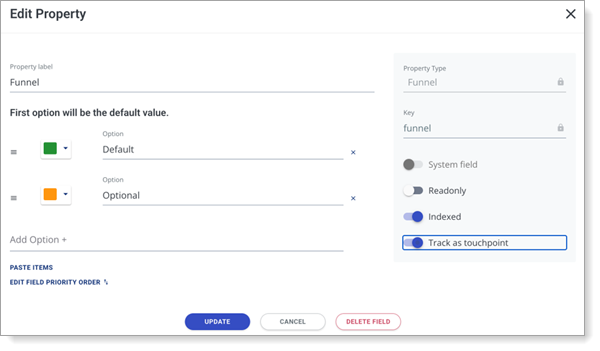
Then, changes to that property are recorded in Contact Activity and can be used when building segments. You can identify contacts who moved into a specific funnel stage during a selected timeframe, even if they have since moved to another stage.
This enhancement provides greater visibility into how contacts progress through the funnel and can help you target follow-up communications based on recent movement.
Building Contact Segments Based on Payment Activity
Starting September 7, this enhancement is automatically available for use by all CASs and participating programs. No action is required on the part of any association, school, or program. Contact a member of your account team for more information.
You can now use payment activity touchpoints when building contact segments. This allows you to identify contacts based on payment activity and combine payment criteria with other contact touchpoints when creating targeted segments.
ResidencyCAS Medical School Portal
Roles Have Been Added to User Accounts
Users can now specify their organizational role in their account. This enables individuals in specific roles, such as the Dean of a Medical School, to receive more tailored communications from [CAS NAME]. Roles do not alter user permissions or functionality within the system.
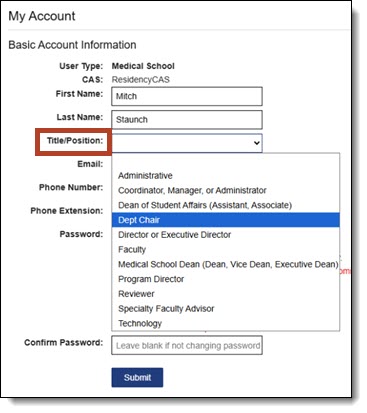
To edit your role, click Account in the top-right of the Medical School Portal, choose the appropriate Title/Position from the drop-down, and click Submit.
New Help Center Article: Advisor Resources
A new article titled Advisor Resources has been added, which includes helpful tools and resources to better assist your applicants as they complete their ResidencyCAS application.
ResidencyCAS Interview Portal
Send Emails Directly from the Interview Portal
You can now send emails to applicants directly from the Interview Portal, eliminating the need to switch back to the Program Portal. This allows you to send invites to all applicants in the Invited and Ready for Scheduling status directly within the Interview Portal, streamlining your workflow.
You can now choose from two email options:
- Use a saved template: email templates that you've created in the Program Portal are now accessible in the Interview Portal. Select one to quickly send consistent, reusable communications to applicants.
- Compose an ad hoc email: write a new, one-time email directly in the Interview Portal. Ad hoc emails are not saved for future use.
Additionally, emails sent from the Interview Portal are tracked in the Program Portal, just like emails sent directly from the Program Portal.
Enhanced Video Experience: Your Video Settings Now Save
Video settings now save from event to event. Once configured, a user's preferences are automatically remembered when they join another event from the same browser and device. This ensures that all participants are well-prepared the moment they enter the room.
The following settings are saved:
- Theme
- Background
- Participant display name
- Audio settings
- Camera settings
Enhanced Video Experience: Chat in Event Rooms
Event rooms (i.e., meeting rooms and social events) now include a chat feature, giving participants an easy way to communicate without interrupting the event.
The chat function is enabled by default, but can be disabled by clicking the More icon within the chat bubble.

New Event Type: Social Events
You can now create and invite applicants to Social Events that are separate from an applicant’s scheduled interview day. Use Social Events to give applicants additional opportunities to connect with your program through experiences such as:
- Program-wide tours
- Presentations
- Meet and greets
- Informal social gatherings
- Other events for applicants participating in the interview process
When creating a social event, programs can invite applicants in the Interview Scheduled status, making it easy to engage eligible applicants beyond their individual interview schedule.
This provides programs with a flexible way to showcase their culture, connect applicants with faculty and residents, and offer a more complete view of the program experience.
The Meeting Rooms section within the left navigation panel is now named Event Rooms.
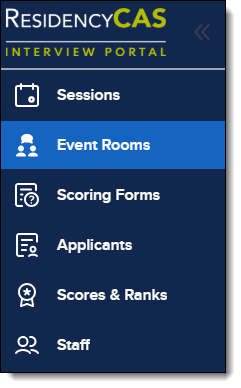
This section comprises both meeting rooms and social events.

For step-by-step instructions on building a social event, review our Using Event Rooms article.
Join Event Rooms Before They Begin
All participants of a meeting room or social event can now join up to 2 minutes before its scheduled start time, at which point the Join button will become available. The event name, and scheduled start and end times are displayed in the room header. This provides clarity on the scheduled times of the event rooms while allowing the flexibility to join the room early.
Transfer Planner Enhancements
The following enhancements are now available in CSU Transfer Planner Student and Campus (i.e., University and Community College) Portals. If you have any questions about these features, contact a member of your account team or support.
CSU Transfer Planner Campus (i.e., University and Community College) Portals are built upon the Liaison Outcomes product, and so where you see "Outcomes" listed below, it applies to CSU Transfer Planner as well.
Disclaimer: on rare occasions, a new feature or enhancement may be moved to a future release or otherwise subject to change.
Student Portal: TSP Badge for My Followed Programs
From the My Transfer Plan page, the My Followed Programs menu section now includes a TSP badge for students with a TSP Enrollment. This increases the visibility of a student's TSP program.

Universal Advisor Portal Enhancements
Updated Advisor Documents Report
This enhancement is automatically available for use by all CASs that collect final decisions. No action is required on the part of any association, school, or program. Contact your Account Manager for more information.
You can now access the Advisor Documents report that contains final decision data for the 2024-2025 cycle. Only applicants who authorized the release of their data to advisors at their primary college attended are included in this report.
WebAdMIT Enhancements
The following enhancements are now available in WebAdMIT. If you have any questions about these features, contact a member of your account team or support.
Disclaimer: on rare occasions, a new feature or enhancement may be moved to a future release or otherwise subject to change.
Internships & Clinical Experiences One-to-Many Fields in Export Manager
This enhancement is automatically available for use by all CASs and participating programs. No action is required on the part of any association, school, or program. Contact a member of your account team for more information.
Certain fields in the application allow applicants to enter more than one answer; for example, an applicant can have one experience, five experiences, or more. These are called "one-to-many" fields in WebAdMIT, and when you export these one-to-many fields, the data will appear in repeated columns with numeric suffixes (e.g., experience_name_0, experience_name_1, etc.).
Currently, if an applicant has more than one response for the following fields, the data does not populate in repeated columns as normal one-to-many fields do; instead, only one column of data is populated:
- Internships & Clinical Experiences field grouping > Country ISO 3 Code field
Starting in late August 2026, these fields will export correctly as one-to-many fields. If your CAS uses these fields in exports and you previously downloaded this data, you should plan to re-download it to ensure that you are capturing all of the applicant's data.
Note that this data has always appeared correctly when viewing the Applicant Details page or running lists in the List Manager.
New Documentation for Outcomes
Please review the list of new and updated documentation, all accessible in the Liaison Outcomes Help Center.
|
Document |
Details |
|---|---|
| Prelaunch Environment Reference Guide |
Liaison's products, including the CAS Applicant Portal, CAS Configuration Portal, and Liaison Outcomes, have several environments available to you, depending on your needs. This reference guide focuses on the prelaunch environment, where you'll configure your programs in the CAS Configuration Portal for launch in the CAS Applicant Portal. Note that this guide is also available in the CAS Configuration Portal Help Center. |
| Setting Up Single Sign-On |
Outcomes now lets your team set up single sign-on (SSO) without needing to work through Liaison staff. Review Setting Up Single Sign-On to learn how your IT team can configure and test SSO directly in Outcomes. |
New Documentation for WebAdMIT
Please review the list of new and updated documentation, all accessible in the WebAdMIT Help Center.
|
Document |
Details |
|---|---|
| Prelaunch Environment Reference Guide |
Liaison's products, including the CAS Applicant Portal, CAS Configuration Portal, and WebAdMIT, have several environments available to you, depending on your needs. This reference guide focuses on the prelaunch environment, where you'll configure your programs in the CAS Configuration Portal for launch in the CAS Applicant Portal. Note that this guide is also available in the CAS Configuration Portal Help Center. |
Ongoing Maintenance
Please review the list of scheduled downtime/maintenance and product updates.
|
Event |
Date |
Details |
|---|---|---|
|
Sandbox Environment Refresh |
August 27, 2026 |
The WebAdMIT Sandbox environment (uat.webadmit.org) was refreshed with current (cleansed) production data and program configurations. Any test exports, custom fields, etc., in the current sandbox were overwritten. The next sandbox environment refresh is scheduled for October 1, 2026. |
Coming Soon!
Please review the list of upcoming events, including product updates and regional training opportunities.
|
Event |
Date |
Details |
|---|---|---|
|
CAS 3+ Upgrade |
2026 |
Liaison is excited to announce that in the 2026-2027 application cycle, all of our Centralized Application Services (CAS) will be upgraded to a new, mobile-first, and modern applicant portal that we call CAS 3+. Visit the CAS 3+ Upgrade page to learn more about its key benefits and a preview of the upgraded application. |
|
Shared Lookup Table Updates for Fall 2026 |
August 2026 |
Many fields in the CAS Applicant Portal contain predefined answer values that applicants can select; for example, the Country and County fields both have predefined answer values. These values are housed in shared "lookup tables" which are viewable in your CAS's/UniCAS's data dictionary file. Lookup table change requests can be sent to a member of your account team, who will compile and review these requests. New lookup table values will appear in the CAS Applicant Portal in August 2026 (subject to change). Visit the Shared Lookup Table Updates page for more information. |
|
Shared Lookup Table Updates for Spring 2027 |
March 2027 |
Many fields in the CAS Applicant Portal contain predefined answer values that applicants can select; for example, the Country and County fields both have predefined answer values. These values are housed in shared "lookup tables" which are viewable in your CAS's/UniCAS's data dictionary file. Lookup table change requests can be sent to a member of your account team, who will compile and review these requests. New lookup table values will appear in the CAS Applicant Portal in March 2027 (subject to change). Visit the Shared Lookup Table Updates page for more information. |