
Release 6 – June 28, 2026
New Features and Enhancements
CAS API Enhancements
The following enhancements are automatically available for the CAS API, and no action is required on the part of any school or program. If you have any questions about these features, contact support.
Disclaimer: on rare occasions, a new feature or enhancement may be moved to a future release or otherwise subject to change.
Source and Organization Contacts added to CAS API
The CAS Application APIs (v1 and v2) now include:
- A new organizationContacts JSON node (as a child node to the existing programMaterials -> organizations JSON node). This has key contact details including name, email, phone (with extension), role, and notes for each related organization.
- New source and sourceId JSON nodes to indicate where the application data originated. The source is typically populated if the application was created by a Jumpstart process.
For more information, see the CAS API Swagger documentation.
Cal State Apply Fully Supported on CAS API
The CAS API now fully supports Cal State Apply on the CAS 3+ (Mobile UX) platform. This means Cal State Apply partners can integrate with the latest, mobile-first CAS experience using the same CAS API endpoints available to other CAS 3.0 programs.
For more information, see the CAS API Swagger documentation.
CAS Applicant Portal Enhancements
Disclaimer: on rare occasions, a new feature or enhancement may be moved to a future release or otherwise subject to change.
Prevent Saving Date of Birth for Ages Less Than 12 and Greater Than 100
For CASs that use date of birth questions with validation messages, this enhancement is automatically available for use. No action is required on the part of any association, school, or program. Contact a member of your account team for more information.
Some CASs ask a date of birth question that includes a validation message, which calculates the applicant's current age. With this enhancement, if an applicant enters a date of birth that results in a calculated age less than 12 or greater than 100, they cannot save their entry and must enter a new date of birth. This enhancement helps prevent applicants from entering improbable ages.

Optional Custom Message on Payment Submission Confirmation Page
For CASs on the CAS 3+ platform, this enhancement must be approved by the CAS association or UniCAS client for use in the current cycle. If activated, this enhancement is available for all participating programs. CAS association and UniCAS clients: contact a member of your account team for more information or to enable this feature.
CASs can now include a custom message on the payment submission confirmation page. This may be helpful if a CAS wants to encourage applicants for next steps (e.g., contact programs directly for questions, track transcripts and letters of recommendation under Academic Records, etc.).

Customize CAS Status Bar and Application Status Descriptions
For CASs on the CAS 3+ platform, this enhancement must be approved by the CAS association or UniCAS client for use in the current cycle. If activated, this enhancement is available for all participating programs. CAS association and UniCAS clients: contact a member of your account team for more information or to enable this feature.
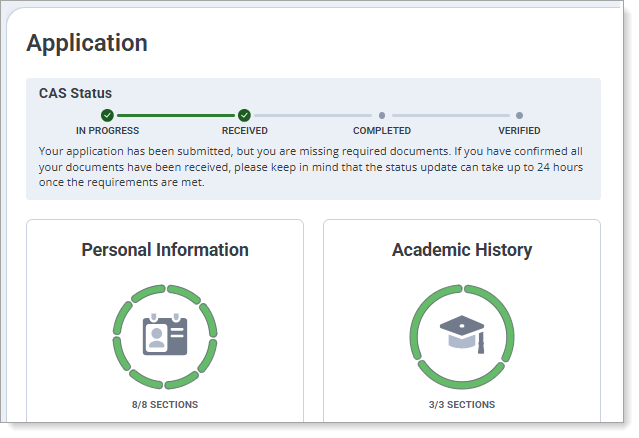
CASs on the CAS 3+ platform can now customize the name of the CAS Status bar and add description text for the In Progress, Received, Complete, and Verified (if applicable) application statuses. This allows CASs to emphasize their unique requirements for application statuses, such as requiring transcripts, letters of recommendation, test scores, etc.
Customize Coupon Code Label
For CASs on the CAS 3+ platform that offer coupon codes, this enhancement must be approved by the CAS association or UniCAS client for use in the current cycle. If activated, this enhancement is available for all participating programs. CAS association and UniCAS clients: contact a member of your account team for more information or to enable this feature.
Some CASs offer coupon codes (also known as "fee waiver codes"), where a program buys coupons from the CAS and gives them to applicants to help offset the application fee. With this enhancement, all CASs on the CAS 3+ platform will have "fee waiver codes" automatically renamed to "coupon codes"; they can also customize the "coupon code" label to another preferred name. This helps CASs who may want to use or avoid different industry terms within the application.

View Prerequisites Link on Transcript Entry Page
This enhancement is automatically available for use by all CASs on the CAS 3+ platform. No action is required on the part of any association, school, or program. Contact a member of your account team for more information.
For CASs on the CAS 3+ platform that also allow programs to configure prerequisites, applicants now see a blue informational box with a View Prerequisites link on the Transcript Entry page. This alerts applicants that some of their programs may require them to match their coursework to prerequisites. Applicants can then click the View Prerequisites link, which opens a new window listing each program and its prerequisites. This enhancement notifies applicants early in the application process of program requirements and future prerequisite matching.

Professional Transcript Entry Fees using PayPal Advanced Checkout
For CASs that use the Professional Transcript Entry (PTE) service, this enhancement will be automatically activated in the next cycle. No action is required on the part of any association, school, or program. Contact a member of your account team for more information.
Some CASs offer applicants the Professional Transcript Entry (PTE) service, where applicants can pay to have Liaison’s PTE team enter the applicant's coursework on their behalf. For CASs that offer this, starting in the CAS's next cycle, applicants can pay the PTE fee using PayPal Advanced Checkout, a feature-rich checkout experience available within PayPal Complete Payments (PPCP). Advantages for Liaison, our customers, and CAS applicants of using PayPal Advanced Checkout over PayFlow Pro include:
- Simplified PCI Compliance: Advanced Checkout uses hosted, embedded fields, meaning customer payment data passes directly to PayPal rather than through Liaison's servers, reducing our security burden.
- Modern Payment Options: Advanced Checkout provides easy access to additional payment methods like Venmo in addition to credit cards and PayPal.
- Better Mobile Experience: Checkout pages are optimized for use on phones and mobile devices to better support modern user behavior.
Note that PayPal considers PayFlow Pro a legacy product and is encouraging customers to transition to PPCP.
CAS Configuration Portal Enhancements
The following enhancements are now available in the CAS Configuration Portal. If you have any questions about these features, contact a member of your account team or support.
Disclaimer: on rare occasions, a new feature or enhancement may be moved to a future release or otherwise subject to change.
Underline Formatting Option Removed from Text Editors
This enhancement is automatically available for use by all CASs and participating programs. No action is required on the part of any association, school, or program. Contact a member of your account team for more information.
The underline formatting option in text editors has been removed. Accessibility standards like WCAG state that underlining should be reserved for links, so to avoid confusion for users with accessibility needs, underlining text is no longer a formatting option.
If your program instructions or home page introduction uses underlining, you may want to review and update your formatting so that underlining is reserved for links only.
Liaison Analytics Enhancements
The following enhancements are now available in Liaison Analytics. If you have any questions about these features, contact a member of your account team or support.
Disclaimer: on rare occasions, a new feature or enhancement may be moved to a future release or otherwise subject to change.
Coming Soon: Inactive Account Cleanup
Starting in early November, to improve account security, accounts that have not been used within the past 18 months, as well as accounts that were created but never activated more than 18 months ago, will be deactivated. If a user requires renewed access, they can follow the standard process to Request an Account.
Liaison Outcomes Enhancements
The following enhancements are now available in Liaison Outcomes. If you have any questions about these features, contact a member of your account team or support.
Disclaimer: on rare occasions, a new feature or enhancement may be moved to a future release or otherwise subject to change.
Self-Service Single Sign-On Setup for Outcomes
This enhancement is automatically available for use by all CASs and participating programs. No action is required on the part of any association, school, or program. Contact a member of your account team for more information.
Outcomes now lets your team set up single sign-on (SSO) without needing to work through Liaison staff. Using SAML (a standard way for systems to share sign-in information securely), your IT team can configure and test SSO directly in Outcomes with clearer options, built-in testing, and more helpful error messages to guide troubleshooting.
Event Registrant Name Sync
This enhancement is automatically available for use by all CASs and participating programs. No action is required on the part of any association, school, or program. Contact a member of your account team for more information.
When a contact's name is updated, this new name now migrates to all associated event registrant lists. This enhancement keeps event rosters in sync with contact records, helping to ensure that you'll always see the current information while managing your events.
ResidencyCAS Interview Portal Enhancements
Interview Time Restrictions Removed
When creating an interview session and schedule, there are no longer restrictions on session start times or interview durations. The minimum interview duration has been decreased from 5 to 1 minute, and the total interview duration no longer needs to be in 5-minute intervals. This improves scheduling flexibility, as sessions can now start at any point, and the interview time and total interview duration can be as long or short as necessary.
Example of Room Settings for a session that begins at 9:03 AM, with 2-minute interview and 1-minute review durations:

Enhanced Cohort Assignment Flexibility
You can now update applicant cohort assignments before an interview session is full. Previously, cohort assignments could only be changed after all interview slots in the session were filled. This provides greater flexibility when organizing applicants into interview cohorts during scheduling.

ResidencyCAS Program Portal Enhancements
Evaluations Now Autosave
When completing application review forms, they now automatically save after every edit. This guarantees that no work is ever lost, allowing you to review applications at your own pace.
From the review panel, you’ll notice a few new features on the review form:
- Draft Status: indicates whether the review is Not Started, a Saved Draft, or Submitted.
- Draft Last Saved Date: when the review was last saved.
- Save Now: while your changes are saved automatically, Save Now provides an extra level of confidence when you want to save your work immediately.

You can access your saved reviews and resume work on them from the Toolbar at the top of the Applications Grid.

Note: in progress reviews are specific to each reviewer. No other user, regardless of their role, can view another user’s drafts or draft statuses. Only submitted reviews are visible to others.
Manage Your Program's Branding
You can now manage your program branding, including the image and description applicants see during the application process, directly in the Configuration Portal. Instead of submitting a branding request form, you can view and update your program's branding yourself, making it faster and easier to keep your program information current.

Enhanced Applicant Activity History
Within the full application, the Activity History section has been redesigned to make it faster and more intuitive to use. You can now search for and filter historical events to quickly find application milestones, reviewer activity, comments, and email communications. You can also view previously sent emails, making it easier to view communication details without leaving the application.

- Search Function: search for keywords related to an activity, such as "email", "review", "phase", or "comment".
- Time Window: choose a timeframe of activity to view.
- Filters: choose from a list of filters to narrow your activity search.
- Email Preview: preview an email sent to the applicant.
- Email History: view the full history of the email sent.
Transfer Planner Enhancements
The following enhancements are now available in CSU Transfer Planner Student and Campus (i.e., University and Community College) Portals. If you have any questions about these features, contact a member of your account team or support.
CSU Transfer Planner Campus (i.e., University and Community College) Portals are built upon the Liaison Outcomes product, and so where you see "Outcomes" listed below, it applies to CSU Transfer Planner as well.
Disclaimer: on rare occasions, a new feature or enhancement may be moved to a future release or otherwise subject to change.
Student & Campus Portals: TSP Questionnaire New High School Attended Questions
Starting August 1, the TSP questionnaire will include two new questions about high school attended, which have Yes/No answers:
- Will you graduate or leave high school in 2026?
- Did you graduate from high school early and then take a Summer semester at college following your high school graduation?
Campus Portal users: while these questions are currently available in CSU Transfer Planner so that you can begin creating any desired mappings, data won’t appear in them until after August 1.
WebAdMIT Enhancements
The following enhancements are now available in WebAdMIT. If you have any questions about these features, contact a member of your account team or support.
Disclaimer: on rare occasions, a new feature or enhancement may be moved to a future release or otherwise subject to change.
Parent/Guardian One-to-Many Fields in Export Manager
This enhancement is automatically available for use by all CASs and participating programs. No action is required on the part of any association, school, or program. Contact a member of your account team for more information.
Certain fields in the application allow applicants to enter more than one answer; for example, an applicant can have one experience, five experiences, or more. These are called “one-to-many” fields in WebAdMIT, and when you export these one-to-many fields, the data will appear in repeated columns with numeric suffixes (e.g., experience_name_0, experience_name_1, etc.).
Previously, if an applicant had more than one response for the following fields, the data did not populate in repeated columns as normal one-to-many fields do; instead, only one column of data was populated:
- Parents/Guardians field grouping > County of Legal Residence Code field
- Parents/Guardians field grouping > School Country Code field
Starting in late June 2026, these fields export correctly as one-to-many fields. If your CAS uses these fields in exports and you previously downloaded this data, you should plan to re-download it to ensure that you are capturing all of the applicant's data.
Note that this data has always appeared correctly when viewing the Applicant Details page or running lists in the List Manager.
Coming Soon: Internships & Clinical Experiences and Observation Hours One-to-Many Fields in Export Manager
This enhancement is automatically available for use by all CASs and participating programs. No action is required on the part of any association, school, or program. Contact a member of your account team for more information.
Certain fields in the application allow applicants to enter more than one answer; for example, an applicant can have one experience, five experiences, or more. These are called “one-to-many” fields in WebAdMIT, and when you export these one-to-many fields, the data will appear in repeated columns with numeric suffixes (e.g., experience_name_0, experience_name_1, etc.).
Currently, if an applicant has more than one response for the following fields, the data does not populate in repeated columns as normal one-to-many fields do; instead, only one column of data is populated:
- Internships & Clinical Experiences field grouping > Country ISO 3 Code field
- Observation Hours field grouping > Address 2 field
Starting in early August 2026, these fields will export correctly as one-to-many fields. If your CAS uses these fields in exports and you previously downloaded this data, you should plan to re-download it to ensure that you are capturing all of the applicant's data.
Note that this data has always appeared correctly when viewing the Applicant Details page or running lists in the List Manager.
WebAdMIT for AMCAS Enhancements
The following enhancements are now available in WebAdMIT for AMCAS. If you have any questions about these features, contact a member of your account team or support.
Disclaimer: on rare occasions, a new feature or enhancement may be moved to a future release or otherwise subject to change.
Data Dictionary for 2027 Cycle
A new data dictionary for the 2027 AMCAS cycle is now available. You can use this to review and update your current data integration process.
New Documentation for Outcomes
Please review the list of new and updated documentation, all accessible in the Liaison Outcomes Help Center.
|
Document |
Details |
|---|---|
| Simplifying Federal Change: How Liaison Supports Compliance and Adaptation |
Liaison is committed to supporting you as you navigate evolving legal and regulatory landscapes. This article provides guidance on how Liaison's products can support your institution's approach to recent legislative changes. |
Ongoing Maintenance
Please review the list of scheduled downtime/maintenance and product updates.
|
Event |
Date |
Details |
|---|---|---|
|
Sandbox Environment Refresh |
June 26, 2026 |
The WebAdMIT Sandbox environment (uat.webadmit.org) was refreshed with current (cleansed) production data and program configurations. Any test exports, custom fields, etc., in the current sandbox were overwritten. The next sandbox environment refresh is scheduled for July 30, 2026. |
Coming Soon!
Please review the list of upcoming events, including product updates and regional training opportunities.
|
Event |
Date |
Details |
|---|---|---|
|
CAS 3+ Upgrade |
2026 |
Liaison is excited to announce that in the 2026-2027 application cycle, all of our Centralized Application Services (CAS) will be upgraded to a new, mobile-first, and modern applicant portal that we call CAS 3+. Visit the CAS 3+ Upgrade page to learn more about its key benefits and a preview of the upgraded application. |
|
Shared Lookup Table Updates for Fall 2026 |
August 2026 |
Many fields in the CAS Applicant Portal contain predefined answer values that applicants can select; for example, the Country and County fields both have predefined answer values. These values are housed in shared "lookup tables" which are viewable in your CAS's/UniCAS's data dictionary file. Lookup table change requests can be sent to a member of your account team, who will compile and review these requests. New lookup table values will appear in the CAS Applicant Portal in August 2026 (subject to change). Visit the Shared Lookup Table Updates page for more information. |