
Release 5 – May 31, 2026
New Features and Enhancements
Cross-Portal Enhancements
Disclaimer: on rare occasions, a new feature or enhancement may be moved to a future release or otherwise subject to change.
Add URLs as a Program Attribute
This enhancement must be approved by the CAS association or UniCAS client for use in the next cycle. If activated, this enhancement will be available for all participating programs in the next cycle. CAS association and UniCAS clients: contact a member of your account team for more information or to enable this feature.
If configured by your CAS, you can now add your program's website URL as a program attribute in the CAS Configuration Portal. The URL will then display as a clickable link in the CAS Applicant Portal. This enhancement allows CASs to highlight program URLs in a program's key details area.
CAS Configuration Portal

CAS Applicant Portal

CAS API Enhancements
The following enhancements are automatically available for the CAS API, and no action is required on the part of any school or program. If you have any questions about these features, contact support.
Disclaimer: on rare occasions, a new feature or enhancement may be moved to a future release or otherwise subject to change.
Organizations API: Contact Role and Phone Extension Support
The GET Organizations (list) and GET Organization (detail) APIs now return organization contact role and phone extension in the orgContacts data, making it easier to identify and reach the right contacts.
For more information, see the CAS API Swagger documentation.
CAS Applicant Portal Enhancements
Disclaimer: on rare occasions, a new feature or enhancement may be moved to a future release or otherwise subject to change.
Application Fee Calculator
For CASs on the CAS 3+ platform, this enhancement must be approved by the CAS association or UniCAS client for use in the current cycle. If activated, this enhancement is available for all participating programs. CAS association and UniCAS clients: contact a member of your account team for more information or to enable this feature.
Applicants can use an application fee calculator to learn what their application fees will be before they need to submit or pay for programs. They can also use the fee calculator to see how fee waivers or application coupons would affect their total payment. This enhancement empowers applicants earlier in the application process, enabling them to better understand the potential cost of applications.
To access the fee calculator, applicants can click the My Programs button in the top-right of the application, then click Calculate Fee.

Liaison Outcomes Enhancements
The following enhancements are now available in Liaison Outcomes. If you have any questions about these features, contact a member of your account team or support.
Disclaimer: on rare occasions, a new feature or enhancement may be moved to a future release or otherwise subject to change.
AI Application Summary
This enhancement must be approved by the CAS association or UniCAS client for use in the current cycle. If activated, this enhancement is available for all participating programs. CAS association and UniCAS clients: contact a member of your account team for more information or to enable this feature.
Outcomes is introducing an AI Application Summary. This feature is designed to help reviewers quickly review the highlights of each application.

AI Application Summaries generate concise, objective overviews of key application content, including:
- Forms
- References
- Documents
- Other Applicant Uploads
Administrators can customize the contents, brevity, and other relevant settings for the summaries. Summaries are generated on demand for each application. Note that AI Application Summaries are informational only and do not score, rank, or recommend applicants. This enhancement supports faster application triage and a more efficient review process. Review Working with AI Application Summaries to learn more.
Application-Related Contact Activity Touchpoints
This enhancement is automatically available for use by all CASs and participating programs. No action is required on the part of any association, school, or program. Contact a member of your account team for more information.
The Contact Activity tab now includes application-related activity, such as when an application is started, and any marketing communications tied to a specific application. To facilitate this, each application activity item is accompanied by the Application Public ID, indicating which application the activity is associated with.
Along with this enhancement, new application-related activity filters are now available. These updates provide a more complete view of each student's journey.
Othot Enhancements
If you have any questions about these features, contact a member of your account team or support.
Disclaimer: on rare occasions, a new feature or enhancement may be moved to a future release or otherwise subject to change.
A Redesigned UI/UX Beta Experience
The engineering and design team's primary focus this quarter has been to deliver the final features and necessary improvements to our Redesigned Othot Platform. We are pleased to announce that the New Othot Experience will be available shortly following the release for our clients in a beta process. Contact your Client Success Director to learn more about accessing your models in the beta environment.
New Features and Enhancements
- Improved Export Options for Scheduled Sensitivities: this enhancement builds upon the previously released ability to schedule an export of sensitivity jobs by improving the format of the exported sensitivity. Scheduled sensitivity exports now provide the aggregated grid in .csv format, combining multi-row "What If" variables into a single consolidated header row for easier import into other systems.
- Added functionality for File Decryption during automated prediction jobs: this new functionality aligns with client-specific data protocols, requiring additional layers of encryption for file delivery. Othot accepts encrypted files and decrypts them as part of the daily automated prediction process.
Other Backend Enhancements
- Added functionality to manage stuck and queued jobs, allowing Othot teams to more easily identify and clear jobs to recover faster.
- Added functionality for better integration server management to reduce delays.
ResidencyCAS Interview Portal Enhancements – June 5
Enhanced Sequential Waitlist Management
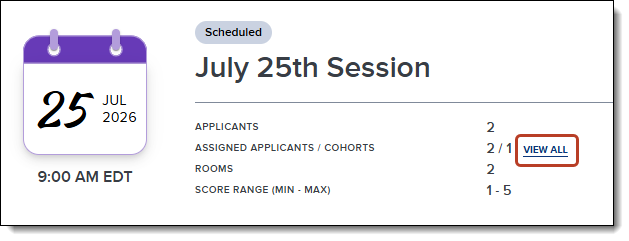
Programs with Sequential Waitlists enabled in their Program Settings can now edit session waitlist orders by accessing Assigned Applicants in the Session Details page, and dragging and dropping them. This allows programs to customize the notification sequence of waitlisted applicants.

Direct Waitlisting for Full Sessions
Applicants can now join the waitlist for full sessions without needing to commit to an open session. Once invited, they have the flexibility to schedule open sessions and/or waitlist for full sessions. They can adjust their choices any time before the applicant deadline. This provides a fully autonomous waitlist process.

Waitlisted Sessions Displayed on Applicant Side Panel
Selecting an applicant in the Applicants section now shows their waitlisted sessions in the side panel, providing a clearer view of their session activity.

ResidencyCAS Program Portal Enhancements – June 5
Improved Assignment Summary Email Logic
Users will no longer receive assignment summary emails if they have no outstanding reviews. This change reduces unnecessary notifications, ensuring that all emails require action.
ResidencyCAS Interview Portal Enhancements – May 18
Enhanced Session Visibility
The information displayed to users assigned to a session has been expanded to clarify schedule details.
- Interviewers and applicants can now see their scheduled sessions, even if the schedule has not been created. This is indicated by a green dot in their calendar view, along with the session details in their list view. This gives a more accurate representation of all scheduled interviews.
- When session visibility is disabled, scheduled interviewers can still see the session and their assigned applicants on their dashboard. This provides clearer schedules and the ability to hide sessions from unscheduled applicants.
- On the Sessions page, a lock symbol appears next to a session’s date where the Session Management Deadline has passed. On its Session Details page, an alert explains this further. This allows program managers to easily identify sessions that applicants can no longer interact with.


Improved Rank List Functionality
- Rank lists now occupy an entire page, reducing the need to scroll.
- You can now manually enter the rank order of each applicant, in addition to dragging and dropping them, for quick and efficient changes.

Required Final Score Comment
When a program manager enters a final score that differs from the average score, an explanation is now required. This helps track why a score was changed, as the Final Interview Score Comment is an exportable field.

Additional Mandatory Room Available
The number of available Required Rooms For All Applicants per session has increased from 4 to 5, enabling the creation of more complex interview schedules.
Transfer Planner Enhancements
The following enhancements are now available in CSU Transfer Planner Student and Campus (i.e., University and Community College) Portals. If you have any questions about these features, contact a member of your account team or support.
CSU Transfer Planner Campus (i.e., University and Community College) Portals are built upon the Liaison Outcomes product, and so where you see "Outcomes" listed below, it applies to CSU Transfer Planner as well.
Disclaimer: on rare occasions, a new feature or enhancement may be moved to a future release or otherwise subject to change.
University Portal: Copy Existing Programs in Configuration Portal
You can now copy an existing program on the Program Confirmation page and use it to build a new program. This enhancement alleviates the need to add additional copies of programs for satellite campuses in ASSIST. Be sure to review every part of the copied program before submitting it for review and approval. Copied programs use the articulation agreement information of the original program.
WebAdMIT Enhancements
The following enhancements are now available in WebAdMIT. If you have any questions about these features, contact a member of your account team or support.
Disclaimer: on rare occasions, a new feature or enhancement may be moved to a future release or otherwise subject to change.
In Progress Applicant Report Available as XLS and CSV File Type
This enhancement is automatically available for use by all CASs and participating programs. No action is required on the part of any association, school, or program. Contact a member of your account team for more information.
You can now download In Progress applicant data as both an .xls and .csv file from the In Progress page (by clicking In Progress under the Applicants panel in the Menu Bar or by clicking In Progress from the Designations by Application Status panel on the dashboard). Previously, this was only available as an .xls file. Additionally, both file types will automatically be uploaded to SFTP sites. This enhancement allows you to manage applicant data in the format that best works for your data needs.

Coming Soon: Parent/Guardian One-to-Many Fields in Export Manager
This enhancement is automatically available for use by all CASs and participating programs. No action is required on the part of any association, school, or program. Contact a member of your account team for more information.
Certain fields in the application allow applicants to enter more than one answer; for example, an applicant can have one experience, five experiences, or more. These are called “one-to-many” fields in WebAdMIT, and when you export these one-to-many fields, the data will appear in repeated columns with numeric suffixes (e.g., experience_name_0, experience_name_1, etc.).
Currently, if an applicant has more than one response for the following fields, the data does not populate in repeated columns as normal one-to-many fields do; instead, only one column of data is populated:
- Parents/Guardians field grouping > County of Legal Residence Code field
- Parents/Guardians field grouping > School Country Code field
Starting in late June 2026, these fields will export correctly as one-to-many fields. If your CAS uses these fields in exports and you previously downloaded this data, you should plan to re-download it to ensure that you are capturing all of the applicant's data.
Note that this data has always appeared correctly when viewing the Applicant Details page or running lists in the List Manager.
New Documentation for Outcomes
Please review the list of new and updated documentation, all accessible in the Liaison Outcomes Help Center.
|
Document |
Details |
|---|---|
| Identifying Degree Types |
Our Advanced Configuration Library provides guidance to help you build custom configurations in Outcomes. In our latest article, Identifying Degree Types, you'll learn to build a field that indicates whether your degree requirement has been met by each applicant. |
| Simplifying Federal Change: How Liaison Supports Compliance and Adaptation |
Liaison is committed to supporting you as you navigate evolving legal and regulatory landscapes. This article provides guidance on how Liaison's products can support your institution's approach to recent legislative changes. |
New Documentation for WebAdMIT
Please review the list of new and updated documentation, all accessible in the WebAdMIT Help Center.
|
Document |
Details |
|---|---|
| Date Field Reference Guide |
In WebAdMIT, applicant files contain various date fields. Some of these dates are affected by applicant activities, while others are affected by the CAS processing documents or other data points. You can review the most common applicant date fields in this guide. Note that you can use many of these dates when identifying new and updated applicants. |
| Simplifying Federal Change: How Liaison Supports Compliance and Adaptation |
Liaison is committed to supporting you as you navigate evolving legal and regulatory landscapes. This article provides guidance on how Liaison's products can support your institution's approach to recent legislative changes. |
Ongoing Maintenance
Please review the list of scheduled downtime/maintenance and product updates.
|
Event |
Date |
Details |
|---|---|---|
|
Sandbox Environment Refresh |
May 28, 2026 |
The WebAdMIT Sandbox environment (uat.webadmit.org) was refreshed with current (cleansed) production data and program configurations. Any test exports, custom fields, etc., in the current sandbox were overwritten. The next sandbox environment refresh is scheduled for June 25, 2026. |
Coming Soon!
Please review the list of upcoming events, including product updates and regional training opportunities.
|
Event |
Date |
Details |
|---|---|---|
|
CAS 3+ Upgrade |
2026 |
Liaison is excited to announce that in the 2026-2027 application cycle, all of our Centralized Application Services (CAS) will be upgraded to a new, mobile-first, and modern applicant portal that we call CAS 3+. Visit the CAS 3+ Upgrade page to learn more about its key benefits and a preview of the upgraded application. |
|
experience: LIAISON | Baltimore |
June 8–10, 2026 |
Set sail with us to explore new strategies, uncover trends shaping the future, and dive into real stories of transformation from peers using Liaison's solutions at experience: LIAISON, June 8–10, 2026 in Baltimore, MD. Register now! |
|
Shared Lookup Table Updates for Fall 2026 |
August 2026 |
Many fields in the CAS Applicant Portal contain predefined answer values that applicants can select; for example, the Country and County fields both have predefined answer values. These values are housed in shared "lookup tables" which are viewable in your CAS's/UniCAS's data dictionary file. Lookup table change requests can be sent to a member of your account team, who will compile and review these requests. New lookup table values will appear in the CAS Applicant Portal in August 2026 (subject to change). Visit the Shared Lookup Table Updates page for more information. |