
Release 10 – November 1, 2026
New Features and Enhancements
CAS API Enhancements
The following enhancements are automatically available for the CAS API, and no action is required on the part of any school or program. If you have any questions about these features, contact support.
Disclaimer: on rare occasions, a new feature or enhancement may be moved to a future release or otherwise subject to change.
SSH Key Authentication for SFTP Destinations
The CAS API now supports SSH keys when creating subscriptions that deliver data and documents to an SFTP destination. This enhancement provides a more secure way to connect to your SFTP server.
To use SSH key authentication, include the following properties in your POST Subscription request:
- sftpUser: the username used to connect to your SFTP server.
- sftpSshPrivateKey: the new property for providing the SSH private key.
Your SFTP server must be configured with the corresponding public key. For additional setup details, see the CAS API Swagger page.
Duplicate Prevention for Supporting Information
The CAS API's POST SupportingInfo "Jumpstart" endpoint now has uniqueness validation, checking for duplicates when adding achievements, experiences, and languages to an application. This enhancement helps prevent duplicate or inconsistent supporting information from being saved in CAS. The relevant section must be enabled in the application in order to post data. Note the following fields used to identify duplicate records:
- Achievements: records cannot have the same values for Type and Achievement Name.
- Experiences: records cannot have the same values for Type, Org Name, Job Title, and Start Date.
- Languages: records cannot have the same values for Native/ First Language.
See the CAS API Swagger page for more details.
Honoring Application Status at the Time of Subscription Events
Since an application's status can change between the time an event occurs and the time its data is delivered, the CAS API now includes two new fields that show the application and program status when a subscription event was triggered. These fields help you distinguish the status that triggered the event from the current status delivered through the API.
- applicationStatusOnEventTrigger: the application's status when the event was triggered.
- statusOnEventTrigger: the selected program's status when the event was triggered.
As the delay between event trigger and application delivery is typically between 0.5 seconds and 10 minutes, these new properties will help avoid potential confusion due to unexpected statuses.
Export Codes Now Supported to Populate Custom Question Answers
The CAS API's POST QuestionAnswers "Jumpstart" endpoint now supports export codes to identify answer options when populating custom question answers. This enhancement provides a more reliable way to select the intended answers through your integration.
The new "answerExportCodes" property accepts:
- Single values (e.g., ["currentApp"])
- Multi-select (e.g., ["AMEM","EMFM","EMPEDS","OBGYN"])
Export codes are available in the CAS API Data Dictionary. Use the Data Dictionary as your source for the values to include in your requests.
See the CAS API Swagger page for more details.
Replay Subscription Events Across Your CAS Instance
The CAS API now supports instance-level Replay, which allows you to request the resending of business events generated via instance-level subscriptions. The new instance-level endpoint will appear under the "Replay" resource on the CAS API Swagger page. Note the following limitations:
- The maximum date range is 10 days. This is the time between the fromDate and toDate query parameters.
- The maximum replayable events are 20,000. If your request exceeds this limit, the API returns an error asking you to reduce the range.
See the CAS API Swagger page for more details.
Liaison Analytics Enhancements
The following enhancements are now available in Liaison Analytics. If you have any questions about these features, contact a member of your account team or support.
Disclaimer: on rare occasions, a new feature or enhancement may be moved to a future release or otherwise subject to change.
Coming Soon: Inactive Account Cleanup
Starting in early January, accounts that have not been used within the past 18 months, as well as accounts that were created but never activated more than 18 months ago, will be deactivated. This enhances the security of Analytics and ensures only current and active users can access data. If a user requires renewed access, they can follow the standard process to Request an Account.
Liaison Letters Enhancements
Disclaimer: on rare occasions, a new feature or enhancement may be moved to a future release or otherwise subject to change.
Dashboard Search and Load Time Improvements
This enhancement is automatically available for use by all CASs and participating programs. No action is required on the part of any association, school, or program. Contact a member of your account team for more information.
The dashboard has had the following improvements:
- The load speed for dashboard content has increased, which decreases wait times for recommenders to view and access their requests.
- The search bar is more prominent and allows recommenders to search on more fields, including the applicant's name, email, CAS, ID, recommendation type, and program/school (if available).
These enhancements are especially helpful for recommenders who handle high volumes of recommendation requests, enabling them to work more efficiently.
Liaison Outcomes Enhancements
The following enhancements are now available in Liaison Outcomes. If you have any questions about these features, contact a member of your account team or support.
Disclaimer: on rare occasions, a new feature or enhancement may be moved to a future release or otherwise subject to change.
Marketing Campaign Conversions
This enhancement is automatically available for use by all CASs and participating programs. No action is required on the part of any association, school, or program. Contact a member of your account team for more information.
Outcomes now allows you to measure marketing campaign conversions. A conversion is a desired action a recipient takes after receiving outreach from a campaign track, such as starting an application, registering for an event, or making a payment. Tracking conversions helps you measure whether your outreach is leading to the results you want.
For each campaign track, you can configure up to three conversion actions and define a conversion window that determines how long after the track ends an action can count as a conversion.
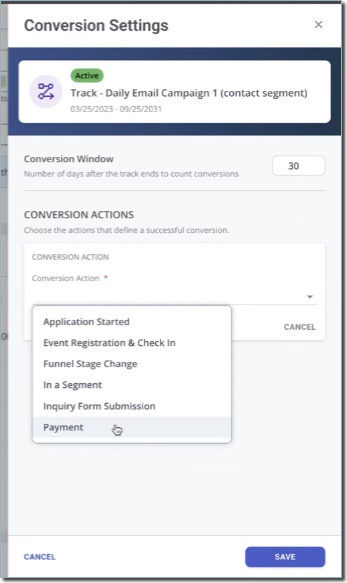
Supported conversion actions depend on the track's audience type:
- Conversion actions for applications: Application Stage Change, Application Started, In a Segment, and Payments
- Conversion actions for contacts: Application Started, Event Registration & Check-In, Funnel Stage Change, In a Segment, Inquiry Form Submission, and Payments.
Using segments as a conversion action further helps you pinpoint the results you want. For example, you can create a segment that identifies contacts who became applicants, then use that segment as a conversion action. Outcomes shows you a total conversion count and conversion rate for each track, helping you evaluate your campaigns' performance beyond message delivery and engagement.
New Inquiry Portal Configuration User Interface
This enhancement is automatically available for use by all CASs and participating programs. No action is required on the part of any association, school, or program. Contact a member of your account team for more information.
The Inquiry Portal configuration experience has been redesigned. The updated page organizes existing configuration sections into tabs, and adds a portal preview so you can quickly review the portal’s initial appearance, and offers the option to update your portal's colors without working with CSS code.
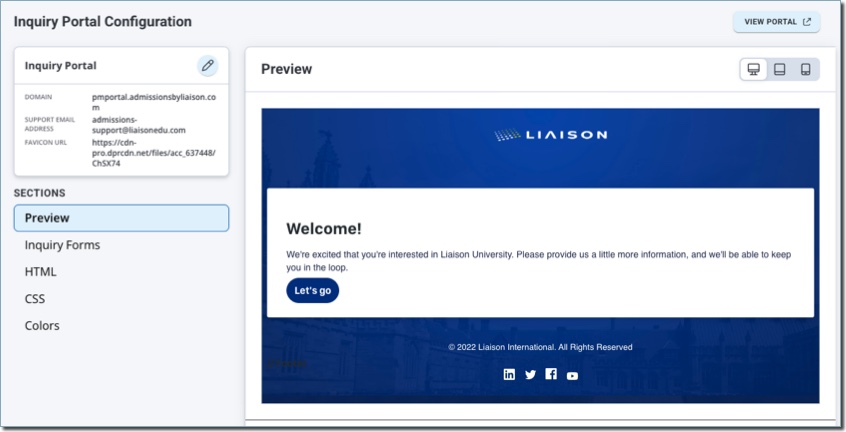
The settings of your existing portals and implementations will not be impacted by this update.
New Reference Portal Configuration User Interface
This enhancement is automatically available for use by all CASs and participating programs. No action is required on the part of any association, school, or program. Contact a member of your account team for more information.
The Reference Portal configuration experience has been redesigned. The updated page organizes existing configuration sections into tabs, and adds a portal preview so you can quickly review the portal’s initial appearance, and offers the option to update your portal's colors without working with CSS code.

Reference forms continue to be configured through the program configuration. The settings of your existing portals and implementations will not be impacted by this update.
Clearer Event Names in Registration and Check-In Touchpoints
This enhancement is automatically available for use by all CASs and participating programs. No action is required on the part of any association, school, or program. Contact a member of your account team for more information.
Outcomes now displays the internal Event Name, rather than the public Event Name, in event registration and check-in touchpoints. This makes it easier to identify the correct event when multiple events share the same public-facing name. For example, staff can distinguish "Nursing Open House (October)" from "Nursing Open House (November)," even if both use "Nursing Open House" as their public-facing name.
You'll see the internal event name in:
- Event registration and check-in activity on contact records.
- The list of events on a contact's Events tab.
- Event series searches, selections, and saved labels in the Event Registration & Check-In touchpoint filter.
Student-facing event names remain unchanged, including those shown in the Student Portal and emails. Note that this enhancement changes how events are labeled, not which registrations match your filters.
Applications Grid Column Limit
This enhancement is automatically available for use by all CASs and participating programs. No action is required on the part of any association, school, or program. Contact a member of your account team for more information.
For more reliability and better performance, Outcomes now limits the number of columns you can add to the Applications Grid. A maximum of 50 columns are allowed at once.
Export Marketing Campaign Analytics Stats
This enhancement is automatically available for use by all CASs and participating programs. No action is required on the part of any association, school, or program. Contact a member of your account team for more information.
You can now export marketing campaign analytics from Outcomes for review and analysis.

You can access the export options from:
- the Campaigns Grid by clicking Export from the 3-dots menu.
- the Campaign Tracks list by clicking Export track from the 3-dots menu.
This allows you to download a CSV file with a point-in-time view of the campaign's current analytics, including campaign and track data.
Add Event to Calendar
This enhancement is automatically available for use by all CASs and participating programs. No action is required on the part of any association, school, or program. Contact a member of your account team for more information.
Event-registration confirmation emails now include an .ics calendar invitation attachment. After registering for an event, your contacts can download the .ics attachment that Outcomes includes in the automated confirmation email, allowing them to add the event to their personal calendar. This applies to all new registrants for events, including registrants you've added manually.
Coming Soon: Classic Email Editor Retirement
Outcomes will retire the Classic HTML editor used to create marketing email templates. After this change, you will no longer be able to create or edit marketing email templates with the classic editor. Instead, continue to use the current email template options. Note that existing templates configured with the classic editor will remain sendable.
Othot Enhancements
If you have any questions about these features, contact a member of your account team or support.
Disclaimer: on rare occasions, a new feature or enhancement may be moved to a future release or otherwise subject to change.
A Redesigned UI/UX Experience
We are pleased to announce the official release of the Redesigned Othot Platform. As you explore the new interface, you'll notice a simpler way to surface insights, run simulations, repeat key workflows, and interpret results with confidence.
Some highlights of the new functionality include:
Generative AI
- Filtering now supports Text-to-Query. Enter natural language in the Text-to-Query field describing a population to produce filters for views and simulations with minimal clicks.
- Individual Page Summaries now take the information about an individual, including all of their data points, predictions, impacts, and recommendations, to surface key insights about that individual.
Key Workflow Enhancements
- Views can now be saved and reused to run prescriptive simulations, such as what-if, sensitivity, matrix, and scenario. Previously, key populations needed to be defined for each simulation.
- All controls related to filtering, managing columns and their order, sorting, and formatting are now consolidated under the new Column Manager. Previously, multiple menu options were utilized to build populations.
- Users can now favorite dashboards, views, and previously run simulations, and quickly filter to their favorites or by keywords to access their most-used items.
- Admin Users can now create tags to group similar dashboards for easier access and filtering. Common use cases include creating tags for specific subpopulations (e.g., Freshmen/Transfers; In-State/Out-of-State; or Program-specific), then viewing all dashboards for that specific population with a single click.
- Year-to-date filters with specific cut-offs for each year or term can now be utilized in views, pivots, simulations, and dashboards to review year-over-year changes within the platform.
- Users can now create a visual using Pivot Charts, which can be saved and loaded on a custom dashboard.
Upcoming Features and Enhancements
We remain committed to keeping our client community at the center of our product direction, ensuring that enhancements are grounded in the questions, decisions, and realities you face every day. Our roadmap continues to evolve based on your feedback. Over the next year, we are working toward three key initiatives:
- Additive enhancements to your workflows and reporting capabilities.
- Introducing agentic experiences to interact with your data and decision simulation tools.
- Continuous improvement in performance and stability.
Transfer Planner Enhancements
The following enhancements are now available in CSU Transfer Planner Student and Campus (i.e., University and Community College) Portals. If you have any questions about these features, contact a member of your account team or support.
CSU Transfer Planner Campus (i.e., University and Community College) Portals are built upon the Liaison Outcomes product, and so where you see "Outcomes" listed below, it applies to CSU Transfer Planner as well.
Disclaimer: on rare occasions, a new feature or enhancement may be moved to a future release or otherwise subject to change.
Student & Campus Portals: Combined View of GE, Major, and ADT Coursework
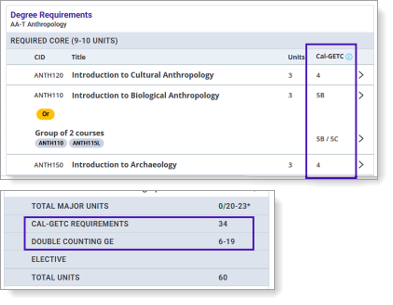
Students can now view General Education (GE), Major, and ADT coursework from a single, combined view. This view also supports students pursuing either the CSU GE Breadth and Cal-GETC general education patterns.

Campus users can also access a combined course summary view.

These combined views simplify finding, accessing, and reviewing matched coursework requirements that appear across multiple pages.
Additionally, on the Followed Programs page, the ADT curricula now show how degree requirements can also be used to meet the Cal-GETC general education requirements. These enhancements help students see that they are maximizing their coursework to meet both degree and general education requirements by indicating whether courses meet one, both, or neither requirement.
Student & Campus Portals: AP and IB Test Updates
Several new Advanced Placement (AP) and International Baccalaureate (IB) tests have been added for students to report, and some of the test names have been updated to reflect the College Board's renaming.
New tests include:
- AP African American Studies (3 units)
- AP Business with Personal Finance (3 units)
- IB Digital Society HL (6 units)
- IB World Religions HL (6 units total; 3 GE Units for Area 3B)
The following tests were renamed:
- AP Studio Art: 2-D Design renamed AP 2-D Art and Design
- AP Studio Art: 3-D Design renamed AP 3-D Art and Design
- AP Studio Art: Drawing renamed AP Drawing
Additionally, some tests have been updated to meet CSU's transfer and general education credit requirements.
- AP Research (updated from 6 units to 3 units)
- IB Business Management HL (6 units)
- IB Computer Science HL (6 units)
- IB Design Technology HL (6 units)
- IB Dance HL (6 units)
- IB Environmental Systems and Societies HL (6 units)
- IB Film HL (6 units)
- IB Global Politics HL (3 units total; 3 GE units for Area 4)
- IB Music HL (6 units)
- IB Philosophy HL (6 units total; 3 GE units for Area 3B)
- IB Social and Cultural Anthropology HL (6 units total; 3 GE units for Area 4)
- IB Sports, Exercise and Health Science HL (6 units)
- IB Visual Arts HL (6 units)
Campus Portals: Tracking Metrics for TSP Matriculation and Transfer Success
To help CSU and CCC users determine student engagement, you can now view a student's account creation and last login date.
Additionally, to help you report on success metrics for the Transfer Success Pathways Program, the following calculations are now available to you:
- TSP Matriculated Success: the matriculated program is the same as the TSP program, and the matriculation date is within the 6-semester deadline.
- TSP Matriculated Expired: the matriculated program is the same as the TSP program, but the matriculation date is past the 6-semester deadline.
- TSP Matriculated Different Program: the matriculated program is different from the TSP program.
- TSP Time to Transfer: this calculation is in semesters from the TSP Enrollment start date to the Matriculation Term and Year.
- Matriculated: STEM: this identifies if the CAS matriculated program is considered a STEM program in Transfer Planner via the CSU Major Pathway for STEM programs.
- Time to Transfer: this calculation is in semesters for all Transfer Planner students with a matriculated bachelor's degree program via the college enrollment term and year to the matriculation term and year.

WebAdMIT Enhancements
The following enhancements are now available in WebAdMIT. If you have any questions about these features, contact a member of your account team or support.
Disclaimer: on rare occasions, a new feature or enhancement may be moved to a future release or otherwise subject to change.
Notification and Deactivation of Inactive Accounts
This enhancement is automatically available for use by all CASs and participating programs. No action is required on the part of any association, school, or program. Contact a member of your account team for more information.
Starting in early November, users who haven't logged in to WebAdMIT in the past 12 months will receive an email notifying them that their account will be deactivated if they don't log in to WebAdMIT within the next six months.
Then, starting in early December, users who haven't logged in to WebAdMIT in the past 18 months will have their accounts deactivated. This enhances the security of WebAdMIT and ensures only current and active users can access applicants and admissions data. To learn more about this and review best practices, visit the Managing Users page.
Updated Pending Transcript Requirement Label
This enhancement is automatically available for use by all CASs and participating programs. No action is required on the part of any association, school, or program. Contact a member of your account team for more information.
For CASs that collect official or unofficial college transcripts, received transcripts are listed in the Documents panel on the Applicant Details page. To help clarify and determine whether a CAS requires transcripts, pending transcripts will be updated to list Not Received or Not Required.
If the CAS requires transcripts or allows programs to set transcript requirements through the CAS Configuration Portal, pending transcripts will appear as Not Received in the Document column. Note that even if your program sets transcripts as not required, pending transcripts will still show Not Received.

If a CAS does not require transcripts, then Not Required will be listed.

Additionally, note the following:
- These changes do not apply to high school transcripts or foreign evaluations.
- While this change automatically applies to all cycles in WebAdMIT, Not Required will only appear for college transcripts once an applicant's data is retransmitted into WebAdMIT. This means that you may not see this change for applicants in the current cycle until their application data is resent to WebAdMIT. Learn which triggers cause an applicant's data to update in WebAdMIT in the How Applicant Data Updates in WebAdMIT article.
New Documentation for Integrations
Please review the list of new and updated documentation, all accessible in the Integration Help Center.
|
Document |
Details |
|---|---|
| Migrating Data from Third-Party Software to WebAdMIT | Learn to use the WebAdMIT data migration process to transfer data from third-party software to WebAdMIT. |
| Migrating Decisions from Third-Party Software to WebAdMIT | Learn to use the WebAdMIT data migration process to transfer decisions from third-party software to WebAdMIT. |
New Documentation for Outcomes
Please review the list of new and updated documentation, all accessible in the Liaison Outcomes Help Center.
|
Document |
Details |
|---|---|
| Managing Your Reference Portal |
Separate from the CAS-based Liaison Letters, Outcomes has its own Reference Portal, allowing you to design an experience to guide applicants through requesting references, and recommenders through submitting these references. Review this guide to learn more about configuring this portal. |
| Working with Touchpoints |
In Outcomes, touchpoints are recorded activities and changes associated with a contact or application. Review this guide to learn more about working with these touchpoints to gain insights into the journey that your contacts and applicants have taken while interacting with your institution. |
| Migrating Exports from Prelaunch to Production |
As you transition from the prelaunch to production environment of Outcomes, you may need to bring over export configurations that you've set up there for testing. For exports that are too complex to recreate manually, review this guide to learn how to migrate these exports by working with JSON and API calls. |
New Documentation for WebAdMIT
Please review the list of new and updated documentation, all accessible in the WebAdMIT Help Center.
|
Document |
Details |
|---|---|
| How Applicant Data Updates in WebAdMIT |
In this updated guide, we review how and when applicant data moves between the CAS Applicant Portal and WebAdMIT at certain points in the application process. Once an applicant submits their application, you can view their full application data in WebAdMIT. |
| Identifying New and Updated Applicants |
In this updated guide, we explain how to find applicants who have recently submitted their application to your program or have updated their application since applying. Included are suggestions of WebAdMIT tools and processes you can use to manage these applicants. |
| Sharing WebAdMIT Across Multiple Programs |
When institutions have multiple WebAdMIT users managing multiple programs, WebAdMIT becomes a "shared space," where these users who can configure the software have access to every program's settings and templates. Use this updated guide to learn how to effectively share your WebAdMIT space. |
| Template Naming Tips |
When creating templates in WebAdMIT, we encourage you to use clear and concise names. This updated guide provides additional helpful template naming tips. |
Ongoing Maintenance
Please review the list of scheduled downtime/maintenance and product updates.
|
Event |
Date |
Details |
|---|---|---|
|
Sandbox Environment Refresh |
October 29, 2026 |
The WebAdMIT Sandbox environment (uat.webadmit.org) was refreshed with current (cleansed) production data and program configurations. Any test exports, custom fields, etc., in the current sandbox were overwritten. The next sandbox environment refresh is scheduled for December 3, 2026. |
Coming Soon!
Please review the list of upcoming events, including product updates and regional training opportunities.
|
Event |
Date |
Details |
|---|---|---|
|
Shared Lookup Table Updates for Spring 2027 |
March 2027 |
Many fields in the CAS Applicant Portal contain predefined answer values that applicants can select; for example, the Country and County fields both have predefined answer values. These values are housed in shared "lookup tables" which are viewable in your CAS's/UniCAS's data dictionary file. Lookup table change requests can be sent to a member of your account team, who will compile and review these requests. New lookup table values will appear in the CAS Applicant Portal in March 2027 (subject to change). Visit the Shared Lookup Table Updates page for more information. |
|
experience: LIAISON San Diego |
June 22–24, 2027 |
Registration is now open for experience: LIAISON | San Diego. Register early by December 11, 2026 to secure our early-bird rate and get $200 off regular registration. Interested in sharing your story? Our Call for Proposals is now open, too! If you've been testing strategies, solving problems, adapting to change, and learning along the way, bring your perspective to the room and give your peers something they can build on. Proposals are due December 9, 2026. |